Workflow to train a model for image recognition?
Hi all,
I'm using the D435i camera and I was wondering what is the best or recommended "high-level" workflow to use the camera and the raw depth data to train a model for image recognition (not necessarily dynamic image recognition). There aren't any examples on that come quite close to what I'm thinking for the application, so that's why I'm asking this question.
Thank you!
-
If you are seeking a relatively easy to use solution that can work with RealSense cameras, I would recommend investigating the OpenVINO Toolkit.
https://software.intel.com/en-us/openvino-toolkit
The RealSense SDK has an OpenVINO compatibility wrapper with a couple of example programs.
https://github.com/IntelRealSense/librealsense/tree/master/wrappers/openvino
You can also accelerate the performance of your computer vision application by plugging an Intel Neural Compute Stick 2 (NCS2) device into an available USB port on your computer alongside the RealSense camera. The NCS2 is available in Intel's official RealSense online store, either in a bundle with a camera or purchasable separately.
-
Hi Nstepin,
Depends if you are trying to get a result from on the edge or via cloud based inference model. On the Edge which means on your local computer use/ load a pre-trained model, often called frozen, into the inference interpreter. Then load image frames, scale the images, to match your model, feed your image into the inference interpreter and after it runs it pops some labels with percentages of certainty. In the cloud its somewhat the same but you have big machine do the number crunch but you pay a latency cost going to the internet and back.
The interpreter can be OpenVino, or Tensoflow or PyTorch or whatever fits your needs and speed. OpenVino from what little I know can convert frozen graphs by other Deep Learning toolkits.
The creation of models can be custom programming using Keras which is pretty straight forward or you can start with a pre-trained model. Model creation is a science all by itself for all layers are not created equal. Freezing the trained model into something that the inference engine can understand can make you scream. Once thats over you load it into an inference engine for comparison to your images. What hardware and OS for which inference engine matters and can cause you a headache.
All in all good fun.
-
Thank you so much, MartyG and Btasa!
I have some follow-up questions on the process and a separate question.
The separate question is what is the depth resolution of the camera in terms of mm? What I mean by that if that if I'm using the camera to look at an object at the range at which the camera is "sensing" the depth, will it calculate to the nearest cm? Nearest 5 mm? So on.
I would be trying to get the result from the edge. The image frames would be the depth frames from the RealSense, correct? They could also be scaled and fed into the inference interpreter using the RSL, no? For the model creation that is fine, but I will probably need to create the model based on those depth frames--what is a good format to save those in?
Thank you so much again,
Nstepin -
I'm glad I could be of help!
The Chief Technical Officer of the RealSense Group at Intel (agrunnet) discusses the depth resolution of the 400 Series cameras in detail in the link below.
https://github.com/IntelRealSense/librealsense/issues/999#issuecomment-366407953
Regarding your second question, it sounds as though Btasa would be able to provide better expert advice on that subject.
-
>>The image frames would be the depth frames from the RealSense, correct?
Marty knows this one as he is one of the brightest guys here.
I am going from memory. I have not used the camera for a while. I don't recall in the realsense data format
if you got the image data combined with the depth or as two separate frames. What I recall is you
you ask the lib for the depth at location X.Y and get it back. I guess you could use the numeric version of
depth as a gray scale image if you could get it out all at once. The realsense SDK kind of hides this from you.
As an example, something I grabbed from github.
rs2::frameset frames;
frames = pipe.wait_for_frames();std:: cout << frame.get_distance(i, j) << endl;
Where frame is the current image object.
>>also be scaled and fed into the inference interpreter
Yes that is true with a little formatting.
-
Thanks for your continued help, Btasa!
Nstepin, you said that you wanted to get the raw data from the edge. That implies to me that you want the raw data captured by the camera hardware and not a modified ('rectified') image. Is that the case please?
The depth frame is generated from the left and right IR data. So using the IR data is the rawest way to get the data. The Y16 infrared channel is unrectified. The subject is discussed in the link below.
-
Marty will they increase the resolution and move up to 4k cameras so it can get 50m plus distance?
Seems like there are low cost CCD's out there now. This was from 2018
-->from 2018 Sony announces world's highest-resolution image sensor for phone cameras ...
the resolution to 48 effective megapixels (8000 x 6000), which Sony says is ... samples this September, with a unit price of 3,000 yen ($27) each.
Was thinking about getting the Intel Flash Lidar but the limited distance makes it only good for my robo car.
-
Intel traditionally try to pitch RealSense at the lower end of the price range, which means that the components tend to be at the consumer end of the market and powerful capability is provided through clever software or (in the case of L515's MEMS mirror) cleverly engineered yet affordable hardware.
Thinking about it, the main reason for not adopting 4K would be that it would use a lot of USB bandwidth. As the RealSense team develop better and better compression algorithms though, it may become more practical to support ultra HD resolutions. The latest SDK version, for example, added a new Z16 H compression format.
https://github.com/IntelRealSense/librealsense/wiki/API-Changes#version-2321
Gigabit ethernet support as an alternative to USB is also becoming popular with RealSense, especially in special industrial RealSense-compatible models created by companies like FRAMOS (D435e) and LIPS Corp (LIPSedge AE400).
The RealSense SDK does make it possible to align RealSense data with streams from more powerful and expensive non-RealSense cameras though using camera metadata. Here is an example:
-
Thank you so much MartyG and Btasa!
MartyG--the github conversation about the depth resolution of the camera was really helpful.
Btasa and MartyG--that makes sense, but what if I want to extract not just the depth at the x.y. coordinate, but actually within an area of the image/window? How would I go about doing that? Also, I've read that I can align the depth data with color by doing some special manipulations, because the colorizer function actually equalizes the depth--would I be able to use that to characterize depth at different points/areas of the image? I think I eventually would use the openCV/VINO functions to do the training with Keras--is that feasible with what I'm describing up here?
Also, I thought I could use the raw depth data for my needs--the Z16? How is it different from Y16?
Thank you! -
Here is a chart of the formats and their description.
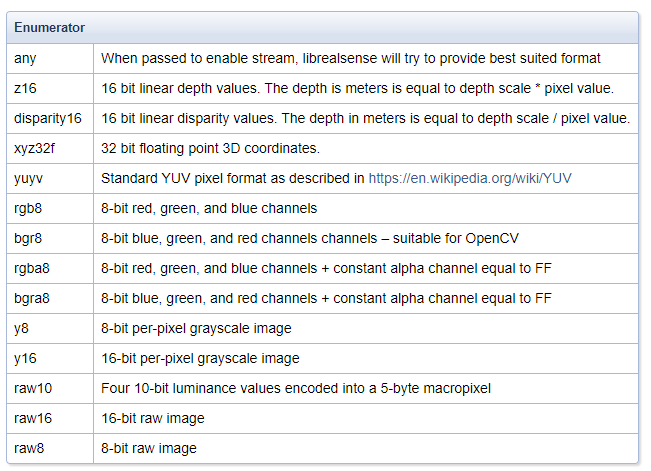
My memory is that not all of the formats in that table, such as the raw ones, are accessible through the RealSense SDK software.
Y16 is IR data and Z16 is depth data.
Dorodnic the RealSense SDK Manager has suggested in the useful discussion linked to below that "you can get raw, unrectified (but also uncalibrated) images from the two infrared images by configuring the camera to Y16 format.. There is some basic scaling going on to make the image visible when rendering as 16-bpp, but you could disable it if you want the raw 12-bpp data from the sensor".
https://github.com/IntelRealSense/librealsense/issues/2482
You can focus on the data in a particular area of the image and ignore ("occlude") the rest by defining a 'bounding box'. Here's an example discussion of this:
https://github.com/IntelRealSense/librealsense/issues/2016#issuecomment-403804157
The colorizer question is best asked at the RealSense GitHub forum by clicking on the link below and using the New Issue button to post a question there.
-
MartyG and Btasa, thank you for continuing to help me.
MartyG--I guess I didn't quite understand, but while browsing I've read that Z16 are "raw" depth values compares as to the colorized values. I guess that's what I meant by saying "raw" depth data. I don't think I understand the difference between Y16 and Z16. I think I will need just the depth values as is, not filtered in any sense.
Thank you for that github thread too.
Btasa--I see. So first I would have to train my models and then when I'm using RealSense camera, pass the frames into the library which will then select the area based on the color image and compare that depth data to what is in the model. Something like that makes sense, no?
MartyG--Will do when I can, thank you!
Thank you again! -
The easiest way to remember the distinction between Z16 and Y16 is that Z16 is the format that is selected when streaming depth. Y16 meanwhile is an IR stream format. You have a choice of more than one selectable IR format (e.g Y8). If you want raw data though, Y16 is the only one of the selection available that is not rectified, and so it is the format to go for if you want unmodified camera data that has not had a distortion model applied to it.
It's one of those things that is much easier to understand when you are doing it instead of trying to explain it! :)
-
>>I see. So first I would have to train my models and then when I'm using RealSense camera, pass the frames into the library which will then select the area >>based on the color image and compare that depth data to what is in the model. Something like that makes sense, no?
That's exactly the process.You need to add one more step, analysis. When you run your model you also need to judge the results to see if you need to add images and retrain the model to get better weights and biases or results.
First remember CNN's are angular sensitive. What you see from a side view is not the same as a top or bottom view. So keep your camera POV in mind when training. Then there is the fact that all the code in the pipeline from training to inference detection is changing all the time. This leads into a roller coaster ride from day to day. From board OS (aka version of Linux or Windows) to hardware, to software tools its always a challenge. AKA TensorFlow 2.0 just came out with changes in process. A new version of Linux could impact your hardware or software. OpenCV ups the version a cool new feature but could break your pipeline. Its very frustrating but in the end it can be GLORIOUS when it works, object recognition to face recognition to pose estimation etc. Its some amazing stuff all because some math guy decided to try back propagation to solve a problem.
Please sign in to leave a comment.
Comments
16 comments