Background removal with OBS and the D435
Just got my D435 and wanted to follow this guide to set it up for background removal with OBS. I tried to follow this guide
https://software.intel.com/sites/campaigns/realsense-technology/chatheads/en/index.html
but the driver and SDK links were old.
I did the following
- install the Intel.RealSense.SDK-WIN10-2.23.0.909 from GitHub https://github.com/IntelRealSense/librealsense/releases/tag/v2.23.0
- Connected via USB 3.2
- The viewer works fine
- Updated the firmware to 5.11.6.250 https://downloadcenter.intel.com/download/28870/Latest-Firmware-for-Intel-RealSense-D400-Product-Family
- Installed OBS Studio 23.2.1
- Add Video Capture Device in OBS
When I see the 430 with RGB Module RGB or with RGB Module Depth.
- Selecting RGB gives a low resolution video feed with a lot of lag.
- Selecting Delphi gives a blank image
I don't see any updated documentation on working with RealSense camera and OBS or background removal. Was the background removal functionality removed? Any help would be greatly appreciated.
Thanks!
-
I'm not aware of a successful case of the 400 Series cameras working with depth-based background extraction (others have tried and had problems too).
A green-screening solution that is claimed by its maker to work with the D435 is MixCast. It contains a background removal function called WildKey that extracts the background using depth data so that a physical green-screen is not needed. It costs $45 a year but has a free trial version so you can test whether it is suitable for you.
https://mixcast.me/docs/using-mixcast?section=wildkey
MixCast's documentation states that it is able to export to OBS Studio.

If you are not using background extraction for the purposes of broadcasting but just want to extract the background, the RealSense SDK has a program called 'Align'. It is available in executable pre-built from in the SDK's "Tools" directory, in an 'Align' and 'Align-Advanced' form. The folder location is 'RealSense SDK 2.0 > Tools'.
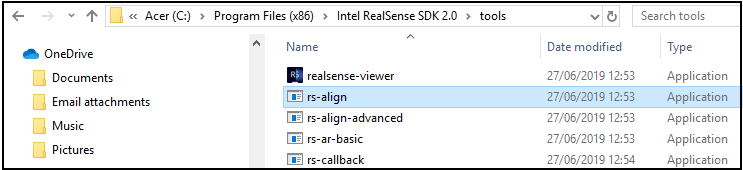
Documentation for 'Align-Advanced' (which allows you to subtract the background progressively with a slider) is here:
https://github.com/IntelRealSense/librealsense/tree/master/examples/align-advanced
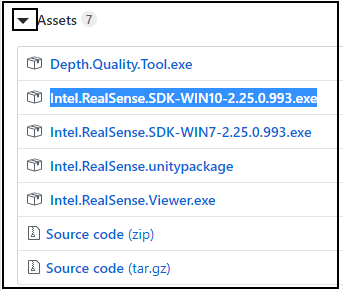
You can download the current RealSense SDK from the link below.
https://github.com/IntelRealSense/librealsense/releases/
Go to the bottom of the information listing for the latest version to find an 'Assets' option with an arrow beside it, and click the arrow to expand open a list of downloadable files.
-
The SR300 camera model used to work with OBS but also now has had problems reported with it.
XSplit (the popular alternative to OBS) now has a program called XSplit VCam that does background removal without a green screen and claims to work with any webcam. Its web-page says that it can work with OBS.
-
I am using XSplit with my other webcam. It works OK. I have a green screen too, but it takes a lot of space to set it up right. Was looking for a simpler upgrade with the Intel.
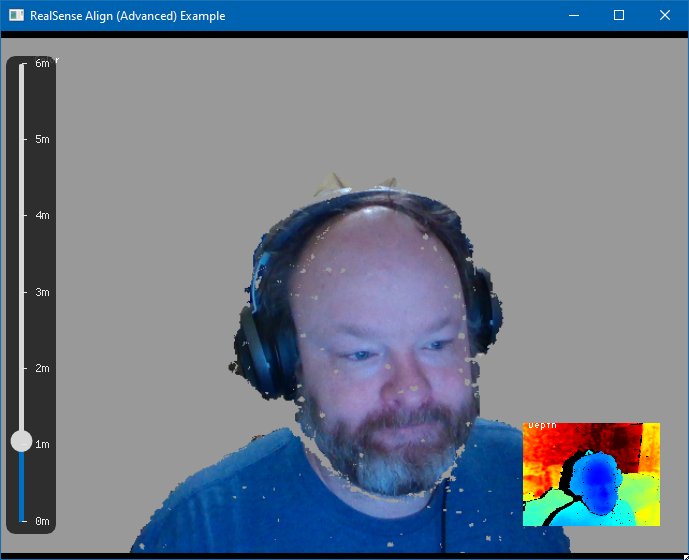
Question maybe you can help with. I noticed that the align-advanced doesn't have any configuration options besides range, but that sometimes after tweaking settings in RealSense Viewer the behavior would be different in align-advanced. Maybe there is some configuration I need to do to make align-advanced work better?
Thanks again for your help!
-
The speckles are likely generated by the IR Emitter component of the camera, which projects a semi-random pattern of dots onto a scene. Their visibility on the image can be reduced by reducing the Laser Power setting's value, or they can be turned off completely be turning off the IR Emitter.
The Laser Power and IR Emitter enable / disable settings, and other settings found in the RealSense Viewer, can be changed with code but you would have to add it to the program yourself and then build the source code to make the program executable. This would require skills with programming software such as Microsoft Visual Studio.
I believe the loss at the edges is occurring because the camera cannot read the depth detail on that side of your face due to the angle at which it sees your head pointed at relative to the camera's position. I'm not sure it would be any better if you were looking straight ahead at the camera, as then it would not be able to properly see either side of the headphones.
Loss of detail can be avoided by using multiple cameras, arranging them around yourself (either in a 180 degree or 360 degree circle depending on how many cameras you want to use) and then assembling the data from all the cameras together into a single image. I can appreciate though that the expense of this option may make it unsuitable.
The new RealSense SR305 camera (which is based on the SR300 model and uses a different camera technology from the 400 Series) lists scene segmentation as one of its key features in its store listing. I would recommend seeking further information from the Intel support staff on this forum though on how this feature will be supported on the SR305 (I am not an Intel employee and do not have that information).
https://store.intelrealsense.com/buy-intel-realsense-depth-camera-sr305.html
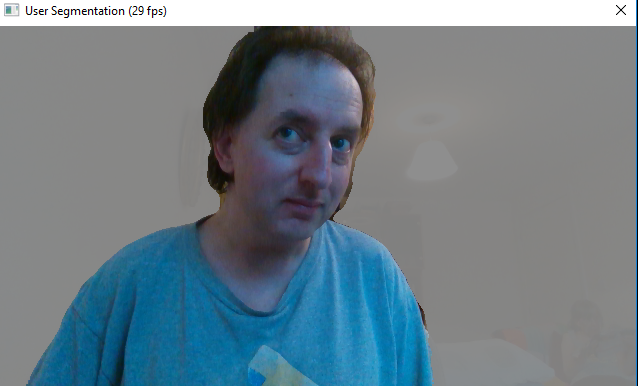
The 2016 version of The RealSense SDK has a segmentation example program that comes with it. I tested it just now with my SR300 and it gives better results than your image, though the camera has to be quite close to you in order for you to not fade out of the image.
-
I'm a software developer, so in theory I could make changes to the program, but as much fun as that sounds, I don't know how much time I want to put into running down that rabbit hole. I like the idea of using multiple cameras, but again, it might be more effort than it is worth.
I've sent a message to Intel Support and I will see what they say. The SR305 does look like a better alternative though. Thanks so much for your help!
-
A quick way to apply settings in the 400 Series without hand coding them all is to set them in the RealSense Viewer and then export the settings in a 'custom preset' file that can then be loaded back in to the Viewer or into your own scripts to instantly restore the saved configuration.
Intel's SDK Manager has said that the SR305 does not 'officially support' the 2016 SDK but it was not clarified whether the camera has been made incapable of using it like the SR300 could or if they just want to dissuade people from using it with the SR305. That is why getting an official response from Intel is important.
Good luck!
-
Customer service finally got back with me about how to get a hold of technical support. Here is the link if anyone else needs it: https://support.
intelrealsense.com/hc/en-us/ requests/new Why it took them two weeks to figure that out is beyond me.
Please sign in to leave a comment.
Comments
12 comments