Is it possible to use the PyRealSense2 wrapper using a USB2.0 port?
I am testing the IntelRealSense's capabilities on a USB 2.0 port as that is what is available to me on the PYNQ-Z1 board. I have the pyrealsense2 libraries built and am able to import them into a script but get an error when I attempt to run pipeline.start:
Traceback (most recent call last):
File "pyrealsense_cv2.py", line 19, in <module>
pipeline.start(config)
RuntimeError: Couldn't resolve requests
I was told that when using a USB 2.0 port instead of a USB 3.0 port, there would be reduced functionality. Is it impossible to use the Python Wrapper over USB 2.0, if not can someone point me in the right direction to set this up correctly? Thanks!
-
If this error occurs, Dorodnic the RealSense SDK Manager has suggested trying another USB2 port or a different cable, or reducing the resolutions used in the sample code (due to the limited range of resolutions available on USB2). The full discussion can be found at the link below:
-
Unfortunately only one USB 2.0 port exists on the PYNQ board that I am working on and lowering the resolution in the sample code didn't fix the issue. Reading through the discussion, it doesn't seem like anyone confirmed that they could get the examples to work over a USB 2.0 connection. Does the RealSense team have any idea whether this configuration is supposed to work?
Thanks for the quick replies!
-
My understanding is that you should be able to use USB2 so long as your code uses a resolution that is available to your board. rs-enumerate-devices can provide a list of the resolution modes supported on your hardware.
I would also recommend ensuring that the camera's firmware driver has an up to date version.
-
The comment that you posted here after this one seems to have disappeared, so I will paste it in below for the benefit of other readers. Looking at the stream definition code you posted though, unless you have defined new values for the variables res_w and res_h, I would guess that they would still represent resolution values not compatible with USB2. I would put the resolution values into the equation directly, like this:
config.enable_stream(rs.stream.depth, 480, 270, rs.format.z16, 30)
Also, I note that your camera identifies as a D400. The color stream would not work in that case if it is a D400 caseless Depth Kit module board, as only the D415 (Module Kit or USB camera) or D435 / D435i (USB camera) have an RGB sensor. The rest of the 400 Series range (400, 410, 420, 430) don't have an RGB sensor for color. It is probably looking for a color mode that the camera doesn't support (note there are no color modes in the rs-enumerate-devices list) and may be erroring over that.
****************
Your lost message:
The rs-enumerate-devices command yields this output:
Device info:
Name : Intel RealSense USB2
Serial Number : 828112070194
Firmware Version : 05.09.02.00
Recommended Firmware Version : 05.11.06.250
Physical Port : /sys/devices/soc0/amba/e0002000.usb/ci_hdrc.0/usb1/1-1/1-1:1.0/video4linux/video0
Debug Op Code : 15
Advanced Mode : YES
Product Id : 0AD6
Product Line : D400
Asic Serial Number : 829313021313Stream Profiles supported by Stereo Module
Supported modes:
stream resolution fps format
Infrared 1 480x270 @ 30Hz Y8
Infrared 2 480x270 @ 30Hz Y8
Infrared 2 480x270 @ 15Hz Y8
Infrared 1 480x270 @ 15Hz Y8
Infrared 1 480x270 @ 6Hz Y8
Infrared 2 480x270 @ 6Hz Y8
Infrared 1 424x240 @ 30Hz Y8
Infrared 2 424x240 @ 30Hz Y8
Infrared 2 424x240 @ 15Hz Y8
Infrared 1 424x240 @ 15Hz Y8
Infrared 2 424x240 @ 6Hz Y8
Infrared 1 424x240 @ 6Hz Y8
Depth 480x270 @ 30Hz Z16
Depth 480x270 @ 15Hz Z16
Depth 480x270 @ 6Hz Z16
Depth 424x240 @ 30Hz Z16
Depth 424x240 @ 15Hz Z16
Depth 424x240 @ 6Hz Z16
When inputting these parameters into the pipeline config like so:config.enable_stream(rs.stream.depth, res_w, res_h, rs.format.z16, 30)
config.enable_stream(rs.stream.color, res_w, res_h, rs.format.y8, 30)
I still get the same error with no new information:RuntimeError Traceback (most recent call last)
<ipython-input-8-b7ad4c41aed3> in <module>()
1 # Start streaming
----> 2 pipeline.start(config)
RuntimeError: Couldn't resolve requests
-
I guess when I edited the post to add the values for res_w and res_h it deleted it from the thread?
I set correct values from the list given by rs-enumerate-devices. I got the depth camera to work, however the color stream still does not work. You said that the problem is that I have a D400 camera, and I understand that the device is registering as such as evidenced from the rs-enumerate-devices command, however I have the box right in front of me and the camera is indeed a D435.
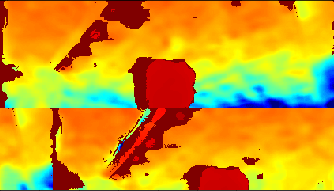
On another note, the depth camera seems to be working incorrectly as seen in the picture below. This is a depth colormap of me.
-
Ok, I think I mis-read the details. The camera is identifying as USB2 (it would identify as 'D435' if it is a D435 model in a USB 3 port) and the D400 is referring to the '400 Series' RealSense product line, not the model number D400.
I believe you should be able to access depth and color with USB2 on a D435. The D435i model does not have color on USB2. Can you confirm please that you have the D435 model, and not the D435i with an added IMU unit?
The bad depth image on USB2 may be an indicator that the camera needs re-calibrating. The Dynamic Calibrator tool can be downloaded from here:
-
@MartyG you are a life saver. The re-calibration fixed all my problems. I am now able to stream at a higher FPS with higher resolution and the recalibration also unlocked other color maps (i.e. RGB, YUYV).
I guess this confirms that it is indeed possible to develop using the Intel RealSense camera on a USB 2.0 port.
Thank you so much!
Please sign in to leave a comment.
Comments
9 comments