Can 3D reconstruction be smoother?
The point cloud reconstruction results obtained by d415 are shown in the figure below.
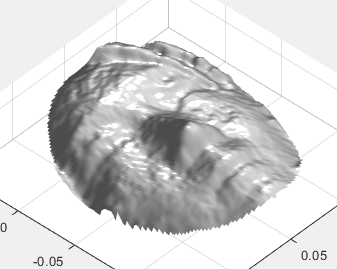
Obviously the surface is not smooth, is the depth camera not adjusted properly.
Also, when recording, I chose post-processing, but the extracted depth and point cloud did not seem to be post-processed.Will the 3D reconstruction effect be better if it is post-processed?
I'm sorry to have so many questions. I hope you can help me.
Thank you!
Another question is whether there are points corresponding to the color image in the ply image that is aligned.
-
Hello 1106569356,
Thank you for your interest in the Intel RealSense D415 camera.
You may find helpful the post-processing white paper below:
Regarding your last question, yes, the export_to_ply function in librealsense exports the points.
Regards,
Alexandra
-
Is post-processing done during recording or after recording?Due to the project, I used matlab to process data.
Another question, if I want to find the point specified in the two-dimensional image corresponding to ply, what should I do?
Thanks!
-
Hi 1106569356,
As the name suggests, the post processing is done after the recording. Please read the white paper I shared previously for more information.
In Intel RealSense SDK 2.0, projection takes a point from a stream's 3D coordinate space, and maps it to a 2D pixel location on that stream's images. It is provided by the header-only function rs2_project_point_to_pixel.
You can find more information here:
https://github.com/IntelRealSense/librealsense/wiki/Projection-in-RealSense-SDK-2.0
Regards,
Alexandra
-
Hello 1106569356,
As mentioned in the post-processing white paper, the command for applying filtering is to take the latest frame as input and to execute the desired processing command multiple times in sequence:
void rs2_process_frame(rs2_processing_block* block, rs2_frame* frame, rs2_error** error);
where the processing block pointer specifies the specific post-processing step. The output frame from each step will then be the input frame to the next processing block, and so on. Only the final processed frame needs to be released before repeating the loop.
Regards,
Alexandra
-
Hi Alexandra,
I wonder if rs2_project_point_to_pixel. is the same as 2D to 3D?
The projection uses the internal parameters, but the 2D to the 3D point cloud, using the camera internal and external parameters. What is the difference between projection 2D to 3D and 2D image to 3D point cloud?
In addition, the internal parameters used in the projection are the internal parameters of the depth camera or the internal parameters of the color camera?
Thank you!
-
Hi 1106569356,
As mentioned in this link https://github.com/IntelRealSense/librealsense/wiki/Projection-in-RealSense-SDK-2.0 I shared with you previously,
- Projection
- Projection takes a point from a stream's 3D coordinate space, and maps it to a 2D pixel location on that stream's images. It is provided by the header-only function
rs2_project_point_to_pixel(...).
- Deprojection
- Deprojection takes a 2D pixel location on a stream's images, as well as a depth, specified in meters, and maps it to a 3D point location within the stream's associated 3D coordinate space. It is provided by the header-only function
rs2_deproject_pixel_to_point(...).
Regards,
Alexandra
-
Hi Alexandra,
I'm sorry, but I don't think you understand my question.What is the difference between rs2_deproject_pixel_to_point and convert depth to point cloud?Because I feel that the calculation inside is very similar, but the former uses internal parameters, the latter uses both internal and external parameters
-
Hi 1106569356,
You can use the rs2_deproject_pixel_to_point function to take a 2D pixel location and map it to a 3D point location within the stream's associated 3D coordinate space.
The point cloud created from a depth image is the set of points in the 3D coordinate system of the depth stream.
Regards,
Alexandra
-
Hi Alexandra,
I would like to know whether the internal parameters in rs2-deproject_pixel_to_point function are the internal parameters of the depth camera or the internal parameters of the color camera?Because the internal parameters of these two cameras are different.
Regards,
Nevyn
-
Hello 1106569356,
As I previously mentioned, de-projection takes a 2D pixel location on a stream's image, therefore the rs2_deproject_pixel_to_point function calls the color stream. Since projection takes a point from a stream's 3D coordinate space, the rs2_project_pixel_to_point function calls the depth and infrared streams.
The relationship between a stream's 2D and 3D coordinate systems is described by its intrinsic camera parameters, contained in the rs2_intrinsics struct. Knowing the intrinsic camera parameters of an image allows you to carry out projection and de-projection.
All this information can be found in the link I shared previously in this thread. Please read it carefully.
Also, please do no post the same question in multiple threads or open multiple threads with the same question
Thank you and best regards,
Alexandra
-
Hi Alexandra,
Sorry to meddle with this problem over and over again, because in my opinion, 2D is both color and depth , so this problem is constantly raised.
When I looked for other questions earlier, one answer was that I needed to consider the camera's internal and external parameters to convert the depth to a point cloud, so I questioned the difference between this question and pixel projection.
In addition, because I am in a hurry to solve this problem, and a lot of unanswered or answered is not the result I want, so I am sorry to ask some questions repeatedly.This may have caused you a lot of trouble. I'm sorry again.
Regards
-
Hello 1106569356,
You can get the intrinsics of any stream, RGB, Depth, or IR.
In this post https://github.com/IntelRealSense/librealsense/wiki/Projection-in-RealSense-SDK-2.0 , it says, "Intrinsic camera parameters can be retrieved from any rs2::video_stream_profile object via a call to get_intrinsics(). (See example here).”
The referenced example shows that you need to specify a video stream in order to get the intrinsics for it:
rs2_intrinsics intrinsics = video_stream.get_intrinsics();
The extrinsics parameters are not specific to one stream, they describe the relationship between two streams, also as explained in the Projection wiki:
“Knowing the extrinsic parameters between two streams allows you to transform points from one coordinate space to another, which can be done by calling rs2_transform_point_to_point(...). This operation is defined as a standard affine transformation using a 3x3 rotation matrix and a 3-component translation vector.
Extrinsic parameters can be retrieved via a call to rs2_get_extrinsics(...) between any two streams which are supported by the device, or using a rs2::stream_profile object via get_extrinsics_to(...) (see example here). One does not need to enable any streams beforehand, the device extrinsics are assumed to be independent of the content of the streams' images and constant for a given device for the lifetime of the program.”
Regards,
Alexandra
Please sign in to leave a comment.
Comments
14 comments