problem with installation of D435i under Raspberrywith Python
Hello,
I would like to install an Intel D435i camera on a Raspberry 4 model B. But I can't install the pyrealsense2 module. In fact the module seems to install but when I want to call pipeline() I am told that the module does not have a pipeline attribute. I looked on the Internet for people who have had this problem but no solution worked. If someone could help me, that would be great. On the Raspberry, I work under the Raspberry Linux system.
Thanks again.
-
Hi Lefebvrep The libuvc backend installation method at the link below works well for installation of the librealsense SDK on Linux on a Raspberry Pi if you have not tried it already. It provides a pre-made installation script called 'libuvc_installation.sh' for building librealsense from source code.
https://github.com/IntelRealSense/librealsense/blob/master/doc/libuvc_installation.md
https://github.com/IntelRealSense/librealsense/blob/master/scripts/libuvc_installation.sh
To build the pyrealsensense2 module at the same time of librealsense, edit line 46 of the libuvc_installation.sh script to include the -DBUILD_PYTHON_BINDINGS:bool=true flag.
cmake ../ -DFORCE_LIBUVC=true -DCMAKE_BUILD_TYPE=release -DBUILD_PYTHON_BINDINGS:bool=true
If you have already attempted a libuvc installation and it has not worked for you, have you tried changing the import pyrealsense as rs line to the following:
import pyrealsense2.pyrealsense2 as rs
-
Although the librealsense SDK can be made to work with Raspberry Pi using installation methods such as libuvc, Intel do not provide official support for the SDK on Pi. I also do not use it on Pi myself. It is not the ideal platform to use RealSense on, as at best a Pi can provide access to basic RealSense depth and color streams but not more advanced features such as IMU data, alignment, post-processing filters, etc.
It is possible to use libuvc to install librealsense, but adding wrappers such as pyrealsense2 or ROS on Pi can be problematic.
The libuvc build script creates a folder called librealsense-master on the computer / computing device. Can you find this folder on your Pi please and then find the build sub-folder. Inside the 'build' folder there should be a 'wrappers' folder, which contains a 'python' folder. So the path to look for would be:
librealsense-master > build > wrappers > python
If you have this 'python' folder on your Pi, could you provide a image please of what files are inside the 'python' folder?
-
Hello,
Here is what is there in the directory build/wrappers/python
The aim of this project is to recognize objects with yolo and the distance between objects thanks to the camera.
It is more simple to use Python, i think.
Thank you for your help.
CMakeFiles cmake_install.cmake Makefile
florian@raspberrypi:~/librealsense/build/wrappers $ ls CMakeFiles/
CMakeDirectoryInformation.cmake progress.marks -
Thanks very much for the information. The build > wrappers > python folder should look like the image below if building of the pyrealsense2 wrapper has been successful. So if you only have the files cmake_install.cmake and Makefile then this indicates that pyrealsense2 has not been successfully built from source.
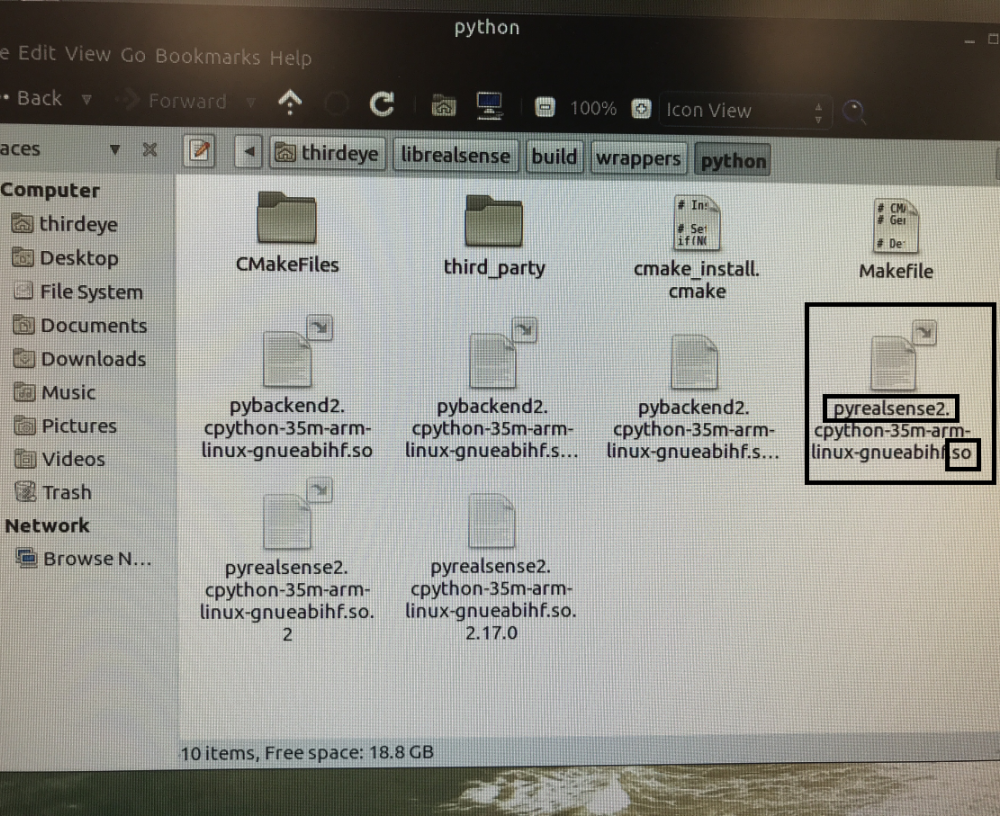
Whilst YOLO is a popular choice with RealSense users for object detection, it is not the only solution available. RealSense has an example Python program called distance_to_object that can identify an object from the RGB image and then calculate a distance in meters to it. It would still require the pyrealsense2 wrapper to be working correctly though.
https://github.com/IntelRealSense/librealsense/blob/jupyter/notebooks/distance_to_object.ipynb
If pyrealsense2 cannot be got working then there is also an official RealSense C++ language example that uses a Deep Neural Network (DNN) model to identify objects from the RGB image and display a distance to them.
https://github.com/IntelRealSense/librealsense/tree/master/wrappers/opencv/dnn
-
Thank you very much for these informations. I think i can make others tests because i have less errors.
Do you think i's easy to use windows 11 to work with these camera and Python ? Is there a procedure ?
I read that with a virtual machine Linux, it's not possible to use these camera ? Is it true ?
Thanks a lot for your help.
-
The RealSense SDK is easiest to install on Windows if you only need the core features such as the RealSense Viewer and the tools and examples. If you want to add further functionality such as Python and ROS wrappers then that is typically more complex to do so on Windows than in Linux though.
If you do not mind using an old Python 3 version then when the RealSense SDK is installed on Windows with the Intel.RealSense.SDK-WIN10 installer program file, you can also automatically install the pyrealsense2 wrapper at the same time. It only works with Python 3.7 though. You would also have to install the older 2.54.1 version of the RealSense SDK, as the pyrealsense2 wrapper is not included in the Windows installer in the versions after 2.54.1.
https://github.com/IntelRealSense/librealsense/releases/tag/v2.54.1

If you would prefer to use a modern Python 3 version then some years ago I wrote a guide to installing the Python wrapper on a Windows PC from packages with the pip install method. The guide was originally written for Python 3.7 but should work for the newest Python 3 version supported for pip installation by the RealSense SDK (which at the time of writing this is Python 3.11).
https://github.com/IntelRealSense/librealsense/issues/6402#issuecomment-629763906
The advice about not using a VM with RealSense that is at the top of the SDK's official source code installation instructions dates back to 2018. In the last few years though it has become possible to use RealSense with a virtual machine (VM), as VM tools such as VMWare introduced USB 3 compatibility that enables them to detect a plugged-in camera.
-
Hello,
Thanks a lot for your help.
I succeed in installing the software for windows and Python 3.7.
But for me, it is very important ti install under the Raspberry.
In fac the aim of my projrct is to create a smart cane for the blind.
I progress but now i have this error :
Traceback (most recent call last):
File "/usr/local/lib/test.py", line 14, in <module>
pipeline.start(config)
RuntimeError: No device connectedIf you have any idea about this problem, thanks a lot.
Perhaps, an other idea to install the camera is to use windows on the raspberry, but does the camera will work ?
thanks.
-
Some years ago there was a project for D435 called Sonic Sight to provide bat-like echo location for the sight-impaired. The project links still work.
https://github.com/sonic-sight/sonic-sight?language=en_US
It is possible to install Windows 10 on Raspberry Pi 4, and it does seem as though it will be the most likely path to success in regard to detecting the camera.
Please sign in to leave a comment.
Comments
9 comments