Depth result difference depending on measurement direction
hello
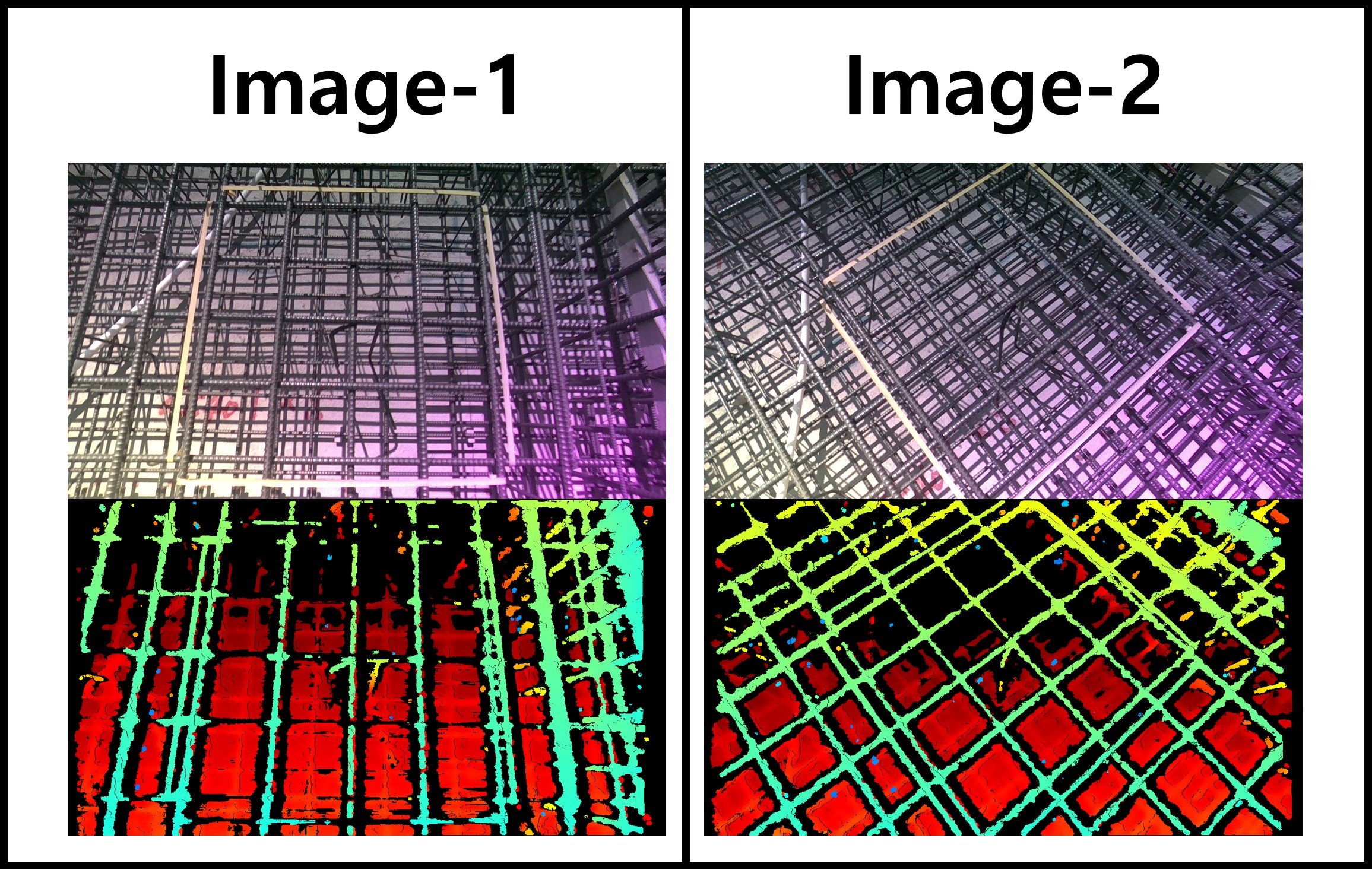
I am measuring rebar at a construction site using an Intel D455 Depth camera.
I have two questions.
1. A purple area is visible at the bottom right of the RGB image captured with the depth camera. Why does the purple area appear?
2. In the attached image, for the same rebar, the data in the depth map taken by maintaining the vertical and horizontal grid of the area of the measured rebar (yellow masking tape area) and the data in the depth map taken diagonally are different. In the case of data taken along a grid(Image-1), horizontal rebars are not clearly visible in the depth map, and in the case of data taken diagonally(Image-2), all rebars are clearly visible. Why is this like this?
-
Hi Dnrdyd0379 This purple hue on the RGB image is a characteristic of the D455 model under certain outdoor lighting conditions. Intel provide advice about it on page 8 (the final page) of a PDF document that can be downloaded in your browser using the link below.
Your horizontal and vertical bars were previously discussed in your earlier issue at the link below.
In regard to why all bars appear when the image is taken diagonally, this could be because the angle of the camera is breaking up 'repetitive patterns' which are disruptive to depth sensing when observing similar looking regular arrangements of horizontal and vertical objects.
Please sign in to leave a comment.
Comments
1 comment