D455 using python to visualize, depth image somtime is blinking like this, I have already upgrade the firemware

-
Hi Dsyuan Are you able to access the RealSense Viewer tool? If you are, please try resetting the camera to its factory-new default calibration using the instructions at the link below.
https://github.com/IntelRealSense/librealsense/issues/10182#issuecomment-1019854487
-
If the camera returns to normal after covering the front of the camera then it can indicate that the left / right infrared sensors may have become saturated. This can occur in very dark or very bright lighting conditions. If auto-exposure is enabled then covering the lenses or - in the case of bright light - turning the camera away from the bright light can enable the camera's auto-exposure to correct the image.
-
The RealSense D455f camera model is equipped with a light-blocking filter on its lenses that is better able to deal with light reflections.
https://www.intelrealsense.com/depth-camera-d455f/
If changing the camera model is not an option then the filter can be purchased separately as the CLAREX NIR-75N filter product and applied externally over the lenses on the front of the camera. An example of a supplier of this filter is Astra Products.
https://astraproducts.com/info-acrylic-nir-filters.asp
If purchasing another camera or a filter product is not possible then a software option for approaching the problem that would not cost money could be to use the High Dynamic Range (HDR) feature.
https://dev.intelrealsense.com/docs/high-dynamic-range-with-stereoscopic-depth-cameras
-
"While this technique can be useful in some cases, it has its limitations. First, depth HDR is implemented on the host and has higher latency and CPU utilization (500-700 µs on i7-CPU) compared to built-in auto-exposure algorithm. We also at this time do not provide an option to combine HDR with auto-exposure as one of the steps. This means finding effecting exposure and gain values for HDR in specific environment can be a challenge. Finally, since we are combining frames with different timestamps, this technique is sensitive to motion. Both rapid motion in the scene and motion of the camera can generate artifacts similar to the effect of the temporal filter. " Based on the limitation it describes, will it effect my saving procedure while I am saving the depth image as PNG and a corresponding timestamp as txt using python.
-
When HDR is enabled, it causes the infrared image to flicker rapidly (the depth image does not flicker). If you only need the depth image then enabling HDR should be the only step that you need to take.
If you will be using infrared though and need to stop it from flickering then you can enable the HDR Merge post-processing filter and then configure the Filter By Sequence id filter to stop the flicker. Instructions for doing so can be found at the link below.
https://github.com/IntelRealSense/librealsense/issues/10505#issuecomment-1126879337
-
When processing is performed on the computer's CPU instead of the camera hardware, there is always a chance that performance may be negatively impacted. I cannot provide guidance on how much HDR might affect your particular computer. I recommend setting rs.option.hdr_enabled to '1' (enabled) to see how it affects your file-saving, if at all.
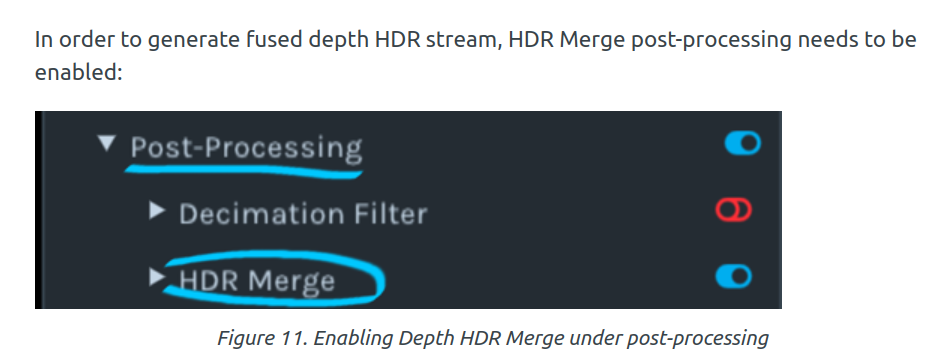 Only one step? Or should I modify the code as well?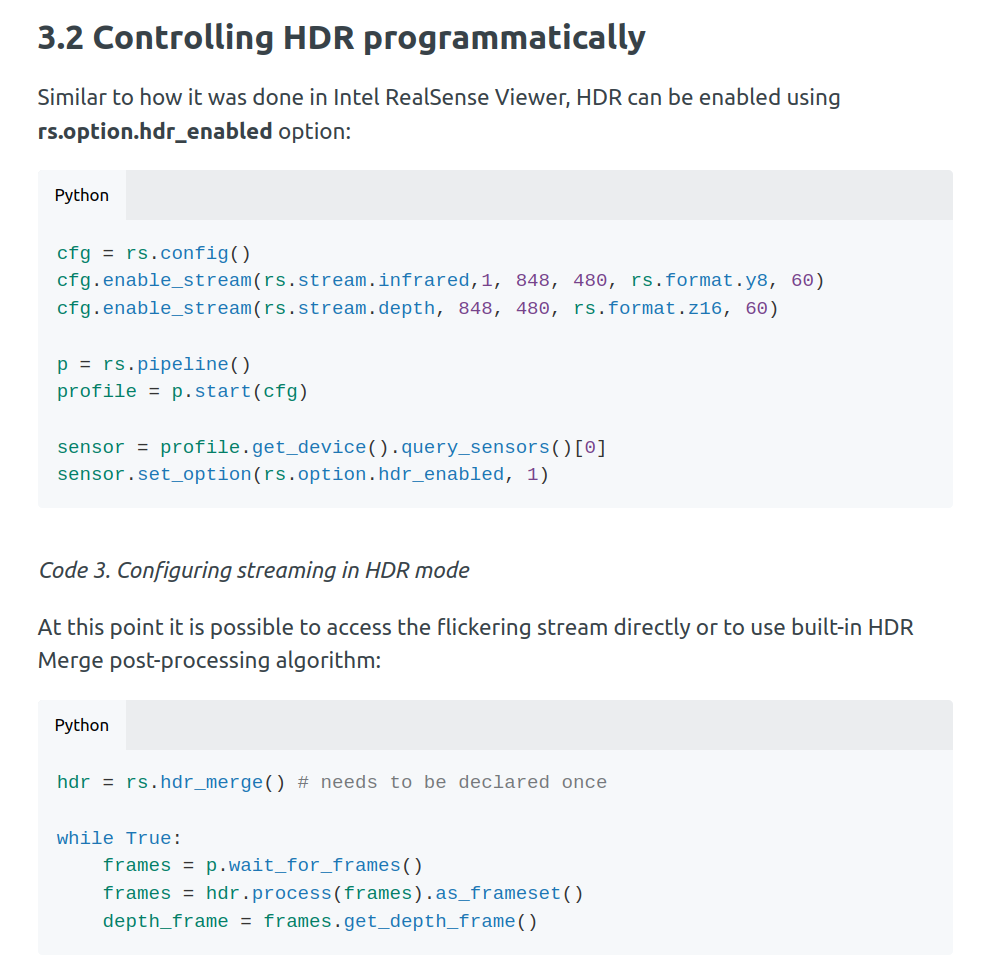
Please sign in to leave a comment.
Comments
13 comments