calibration error 9986
Hello everyone,
I'm reaching out for some assistance regarding an issue I've been facing "Error (9986): Streaming profile is not supported or configuration failed.".
I came across a similar problem discussed in a previous thread on this forum: https://support.intelrealsense.com/hc/en-us/community/posts/13025891795987--error-9986-intel-streaming-profile-is-not-supported-or-configuration-failed-. However, given that the post is quite dated, I'm reaching out in hopes of finding more recent solutions or updates that might have emerged since then.
Details:
Im using the Dynamic Calibrator v2.13.1.0 at a win10 platform to calibrate my Intel RealSense D435I with FW version 5.15.01.00.
The connection is established using USB 3.2 and i have installed the SDK-Version 2.54.2.
I've attempted restoring the factory settings using the RealSense Viewer tool, but this didn't resolve the issue. Additionally, I performed a 'gold reset' using the Intel.RealSense.CustomRW tool, but unfortunately, it didn't help. I even tried rolling back to an older firmware version, yet this didn't make any difference in my situation.
The last fallback in the linked thread is to use the on chip calibration. This works, except for the focal length calibration (wich also failes with an errormsg: "Failed to start streaming (1280, 720, 30)"). So i could only apply the other calibrations. Anyways, the results are still not as i want them to be. I hope the Dynamic Calibrator tool can do the job a bit better, unfortunately, I can't get it to work. Are there any other ideas on how to fix the problem?
-
Hi Thomas Gnaedig Please try resetting your camera to its factory-new default configuration in the RealSense Viewer tool using the instructions at the link below to see whether it improves your camera's images enough to not require the use of a calibration tool.
https://github.com/IntelRealSense/librealsense/issues/10182#issuecomment-1019854487
-
Hi MartyG,
Thank you for your prompt response. I attempted the factory reset once more, but unfortunately, it didn't bring about significant changes.
My issue pertains to the angles and subsequently the geometries within the room. To illustrate, I've set up a simple example involving two boxes and a table. I've arranged the boxes to be stacked one atop the other, which essentially presents me with angles close to 90 degrees.
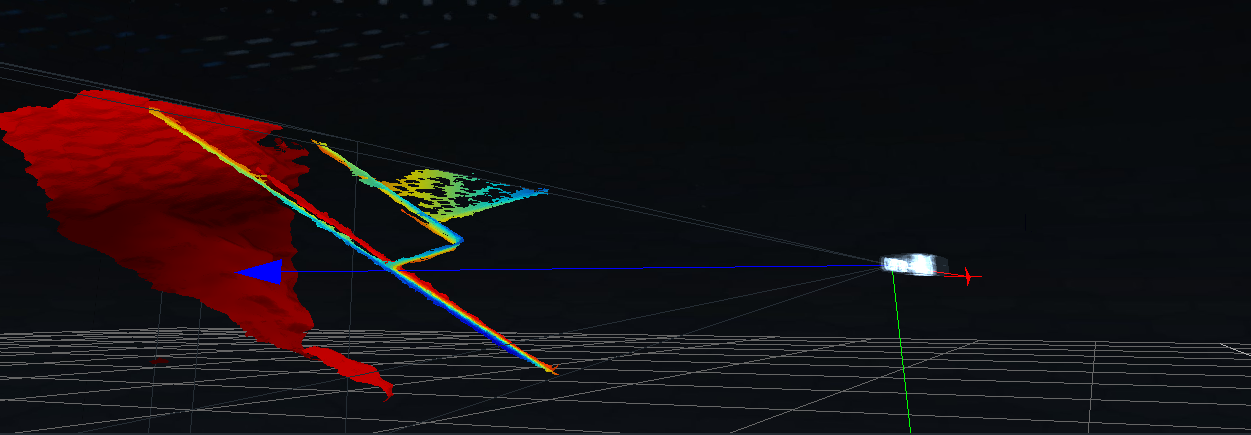
However, as demonstrated in the images, there's noticeable distortion in the geometries.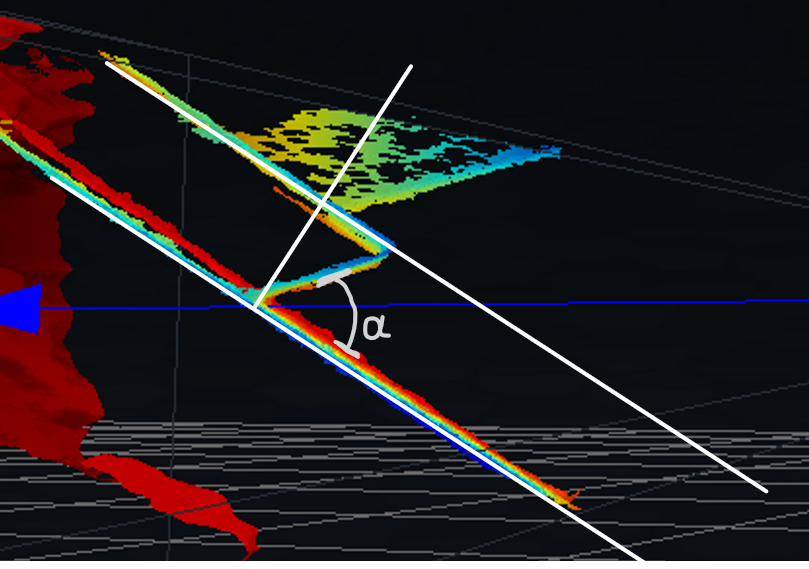
The parallel white lines appear correct, but the angle on the lower box (marked as alpha in the screenshot) is roughly 50 degrees, whereas I anticipated it being closer to 90 degrees. The issue seems even more pronounced with the upper box, but I am currently concentrating on the lower one, given its central position in the image, which should ideally offer the most accurate representation of distances. I had hoped that the tool would bring me an improvement here. Is this an issue that could be resolved through calibration?
BR
Thomas -
Your situation sounds like a past case at the link below where the sides of a box on the image were not 90 degrees even though the box in the real world was 90 degrees.
https://github.com/IntelRealSense/librealsense/issues/6857
The RealSense user in that case found that modifying the camera's Advanced Mode settings using a custom json camera configuration file helped.
https://github.com/IntelRealSense/librealsense/issues/6857#issuecomment-660540868
-
Hi Marty,
Thank you for pointing me to the referenced issue (https://github.com/IntelRealSense/librealsense/issues/6857) and the related issue it references (https://github.com/IntelRealSense/librealsense/issues/5506). Your guidance was immensely helpful. I've checked the exported PLY, and it appears to be correct, indicating that the problem was in the Viewer and not with the data itself.
Thanks a lot!
Please sign in to leave a comment.
Comments
5 comments