D455 the coordinate frames
I have tested the functions to find 3D position of a given pixel point using methods suggested in other post.
My question is what is the origin of the coordinate frame here, and it is located exactly at which sensor.
Looking at the D455 camera from front, and from left to right, we have the following sensors:
Right Infrared Sensor, RGB Sensor, Infrared Projector, Left Infrared Sensor
Could it be located at the RGB Sensor ?
Normally, I always receive some error on the x-coordinate, i.e., 30~49 millimeters. (I have been testing the center point of the image to find its 3D coordinates). The other two dimensions are with little error. I have confirmed it using the realsense viewer.
Please can you elaborate on that, or direct me to some documentation, or some schematic diagrams?
thanks,
-
Hi Zahid Iqbal The origin of depth is the center-line of the left infrared sensor, whilst the origin of RGB is the center-line of the RGB sensor.
When performing alignment between depth and RGB, the origin becomes the sensor that is the target of alignment. So if depth is aligned to color then the origin of depth changes to the center-line of the RGB sensor.
When retrieving coordinates with a script instead of the RealSense Viewer tool and when using depth to color alignment and the get_distance() instruction in that script, there can be error in the X value if the depth intrinsics are used instead of the color intrinsics (since the depth origin becomes the RGB sensor when aligning depth to color). When the incorrect intrinsics are used, the X value may be correct at the center of the image but become increasingly inaccurate when moving out towards the outer edges of the image.
-
thanks,
I am using
rs2::align align_to(RS2_STREAM_COLOR);
That would mean that the origin is the center-line of RGB sensor.
Another question is that, in practice, we should be able to retrieve any pixel 3D value. However, I noticed that for lower pixel values, e.g., (0,0), (5, 12) it did not return valid values.
What is the difference between
point_in_color_coordinatespoint_in_depth_coordinatesDoes this mean, the first one is calculated with reference to the origin of RGB sensor, and the later is for left infrared sensor.
-
It is not guaranteed that every coordinate can return a depth value, because there may be no readable depth value at some coordinates if there is no surface at the corresponding location in the real-world scene (i.e it is empty space) or if the camera is having difficulty reading depth from that surface. For example, areas that have surfaces that are reflective or dark grey / black in color will be difficult for the camera to analyze for depth.
-
At another post, it was mentioned that for D455 the optimal resolution for depth stream is 848 x 480, and for RGB stream it is 1280 x 720.
Does this create any problem when we use the above functions of getting 3D pixel position from 2D pixel coordinates, i.e, having different resolutions in the RGB and depth data?
-
thanks MartyG
I wanted to set some options that would allow better depth calculations.
sensor.set_option(RS2_OPTION_AUTO_EXPOSURE_PRIORITY, 1);

sensor.set_option(RS2_OPTION_EMITTER_ENABLED,1);

sensor.set_option(rs2_option::RS2_OPTION_VISUAL_PRESET, rs2_rs400_visual_preset::RS2_RS400_VISUAL_PRESET_MEDIUM_DENSITY);
I have a few questions here.
- First question is that a value of "1" sets the corresponding option and a value of "0" does not set the corresponding option?
- When the goal is to improve depth calculation accuracy, the above are the right settings for the parameters used ?
- I receive an error when setting some (or all) of the above options. The error is the following
rs2_set_option(options:0x5574f5684cc0, option:Emitter Enabled, value:1):
    object doesn't support option #18
I write the way in which I have accessed the sensor handle.
auto sensor = selection.get_device().query_sensors()[1];
How do we know which index is the depth sensor located ? The following piece of code
vector<rs2::sensor> sensor_list = selection.get_device().query_sensors();
returns 3 values in the sensor_list, though how to access the depth sensor?
-
Yes, with set_option instructions '1' enables an option and '0' disables it.
Setting Auto Exposure Priority to '1' will not improve depth accuracy. Setting Emitter Enabled to '1' and the Visual Preset to 'Medium Density' should improve the quality of the depth image, which can in turn enhance the accuracy of the depth values.
When using query_sensors(), the depth sensor has an index number of '0' and the RGB sensor is '1'.
An exception to this rule is the D405 camera model, where RGB settings are '0' because it is not equipped with an RGB sensor and RGB comes from the depth sensor.
-
Three different methods were suggested in the https://github.com/IntelRealSense/librealsense/issues/11031
Here, the third method uses point cloud. Concerning this method, I have two questions:
- This method can calculate the 3d correspondence of the entire point cloud at once (in a single run of the function). So, at a later instant, one can retrieve the 3d value corresponding to any given 2d pixel value (when such a value exists). The other two methods would need to be provided the 2D pixel point each time a mapping is needed. So the other two methods would need to b e run as many times as there are pixels to be mapped. Is my understanding to this is correct?
- Further, it returns two different points:
float point_in_color_coordinates[3]; // 3D point in color sensor coordinates
float point_in_depth_coordinates[3]; // 3D point in depth sensor coordinates
Does this mean, the same point in 3D but the origin of the coordinate reference frame being in the RGB sensor or in the Depth sensor ?
- Is there a value of the distance between the centers of the coordinate reference origin in RGB sensor and the left Depth sensor?
thanks,
-
Each stream has its own 2D (pixel) and 3D (point) coordinate systems, as described by the RealSense SDK's Projection documentation at the link below.
https://dev.intelrealsense.com/docs/projection-in-intel-realsense-sdk-20
On the D455 camera model the origin of the depth coordinate system will be the centerline of the left infrared sensor unless depth has been aligned to color, in which case the depth origin will become the centerline of the RGB sensor. The origin of RGB will be the centerline of the RGB sensor.
Regarding your question about the three methods, my understanding is that it transforms each pixel in a loop, yes. Alignment can therefore be a processing-intensive operation.
The positional relationship between the centers of the RGB and left infrared (depth) sensor is described by the Extrinsic parameters "Infrared to Color" and "Color to Infrared". In terms of horizontal distance, the centerlines of the D455's RGB and left infrared sensors are 59 mm apart.
-
thanks MartyG
For the purpose of finding 3D position of a given 2D pixel point, we have resorted to alignment of depth and color streams, as implemented in different methods given at https://github.com/IntelRealSense/librealsense/issues/11031 .
On the other hand, we need the RGB data (from an unaligned stream or the regular RGB stream), that could be passed on to certain computer vision related functions, i.e., contour detection etc.
My question is if we use an non-aligned RGB frame / stream and use it to find some object bounding boxes. Then, from the vertices of such bounding boxes (2D pixel coordinates), we find the 3D coordinates. When, to find those 3D coordinates, an aligned RGB stream was used. Would the results be valid.
Do the pixel coordinates in the aligned and non-aligned RGB frame point to the same 3D coordinates?
thanks !
-
Whilst on the D455 camera model the field of view size of the depth and RGB sensors is almost the same, the RGB sensor will be observing a slightly different scene because it is horizontally offset from the depth sensor position on the front of the camera. So depth and RGB on unaligned streams would likely not match up exactly.
D455 does though support RGB from left infrared mode, where you can stream RGB from the left infrared sensor instead of the RGB sensor. As the left IR sensor is also the origin for depth, RGB from left IR is pixel-perfect aligned, calibrated, and overlapped with the depth map.
You can stream RGB from left IR by enabling the Infrared stream with the format set as RGB8 instead of Y8.
-
thanks MartyG
currently this is how the beginning part of my code (that takes care of creating streams, and real-sense pipeline) looks like:
rs2::config cfg;
rs2::align align_to(RS2_STREAM_COLOR);
cfg.enable_stream(RS2_STREAM_DEPTH, 848, 480, RS2_FORMAT_Z16, 30);    // 848x480 is optimal resolution for depth stream on D455
cfg.enable_stream(RS2_STREAM_COLOR, 1280, 720, RS2_FORMAT_BGR8, 30);

auto selection = pipe.start(cfg);

const rs2::stream_profile color_profile = selection.get_stream(RS2_STREAM_COLOR);
const rs2::stream_profile depth_profile = selection.get_stream(RS2_STREAM_DEPTH);

// un-aligned frames
rs2::frameset frames = pipe.wait_for_frames();
rs2::depth_frame depth = frames.get_depth_frame();
auto color = frames.get_color_frame();

// intrinsics and extrinsics
rs2_intrinsics intr_depth = depth.get_profile().as<rs2::video_stream_profile>().get_intrinsics();
rs2_intrinsics intr_color = color.get_profile().as<rs2::video_stream_profile>().get_intrinsics();
rs2_extrinsics color_extrin_to_depth = color.get_profile().as<rs2::video_stream_profile>().get_extrinsics_to(depth.get_profile().as<rs2::video_stream_profile>());
rs2_extrinsics depth_extrin_to_color = depth.get_profile().as<rs2::video_stream_profile>().get_extrinsics_to(color.get_profile().as<rs2::video_stream_profile>());

// aligned streams
frames = frames.apply_filter(align_to);
auto color_aligned = frames.get_color_frame();
// Tell pointcloud object to map to this color frame
pc.map_to(color_aligned);
auto depth_aligned = frames.get_depth_frame();
// Generate the pointcloud and texture mappings
points = pc.calculate(depth_aligned);
Here, the point cloud is calculated from the aligned stream.
- If I use the color_aligned to generate an openCV Mat as such
Mat rgb_cv_img(Size(color_aligned.get_width(), color_aligned.get_height()), CV_8UC3, (void*)color_aligned.get_data(), Mat::AUTO_STEP);
and use it in computer vision algorithms, the pixel coordinates would be match up correctly (for getting 3d coordinates, depth info) ?
- How to generate an RGB stream as you suggested. In that case, we do not need the alignment?
thank you for the support !
- If I use the color_aligned to generate an openCV Mat as such
-
You can stream RGB from left infrared by changing your color config line to the one below.
cfg.enable_stream(RS2_STREAM_INFRARED, 1280, 720, RS2_FORMAT_RGB8, 30);
If you use OpenCV code in your script though then use the BGR8 format instead of RGB8, otherwise the OpenCV RGB image's colors will be reversed.
In regard to your OpenCV code for an aligned image, you should be able to do it that way.
-
MartyX Grover, I am trying to stream RGB from the left infrared sensor as it is supported in D455 model. Here is the code as suggested in the last post.
// stream RGB from left infrared
cfg.enable_stream(RS2_STREAM_INFRARED, 1280, 720, RS2_FORMAT_BGR8, 30);
The following issues happened:
- To account for the OpenCV color convention, I used BGR8 instead of RGB8. However, I receive the following error.
RealSense error calling rs2_get_frame_data(frame_ref:nullptr):
null pointer passed for argument "frame_ref"
If I used RGB8, I can see the image output. It appears dull though as compared to a regular RGB stream.
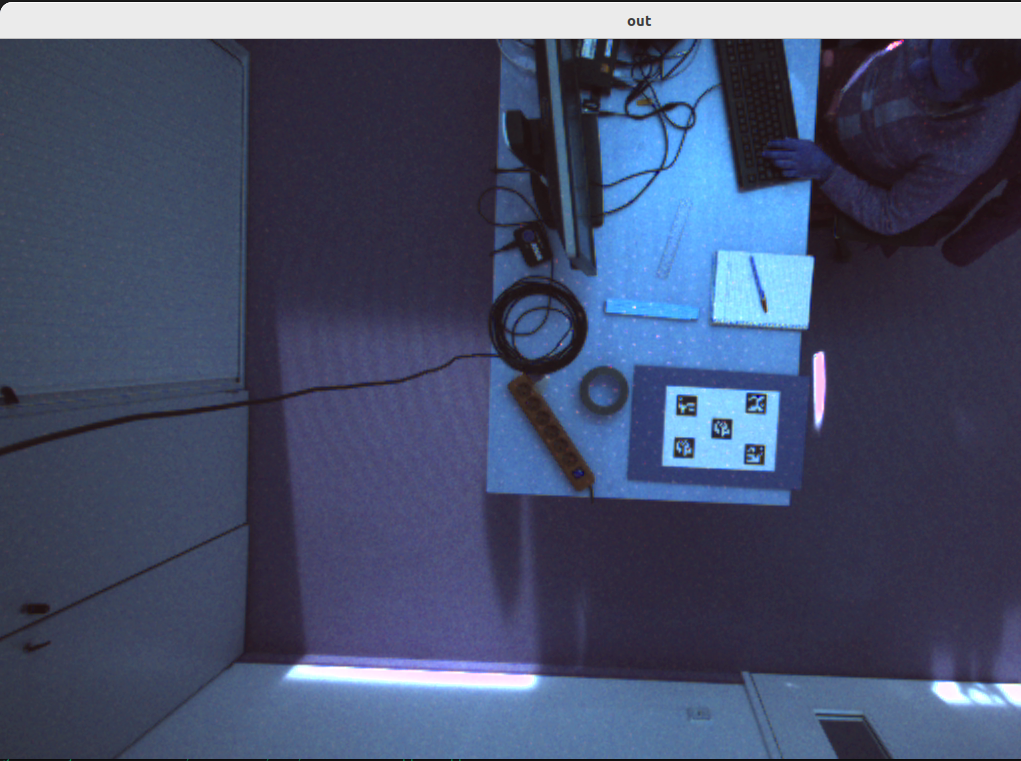
- Another problem is I want to save this image. And, I receive another error.
-215:Assertion failed) !_img.empty() in function 'imwrite'
update: The above openCV error involving 'imwrie' occurred due to a bad image reference. It has been resolved.
In the above code, I just used a single stream.
thanks,
-
Yes, the RGB from left infrared image has some differences to the image from the RGB sensor.
If you are able to disable auto-exposure in your project then the brightness of the RGB from left infrared image can be increased by setting a manual exposure value that is higher than the default exposure value. You would not be able to make the color hues warmer though.
The link below has some advice about exporting the infrared stream to PNG using C++ code
https://github.com/IntelRealSense/librealsense/issues/1480
It recommends using CV_8UC3 for BGR8.
-
Other question I have while using "RGB stream from Infrared sensor"
- If we are calculating the 2d pixel to 3d points mapping. Do we still need to use the depth stream? For example, in the functions below:
rs2::pointcloud pc;
rs2::points points;

frames = frames.apply_filter(align_to);
auto color_aligned = frames.get_color_frame();

// Tell pointcloud object to map to this color frame
pc.map_to(color_aligned);
auto depth_aligned = frames.get_depth_frame();
points = pc.calculate(depth_aligned)

// find corresponding depth point from vertices
const rs2::vertex* tv = points.get_vertices();
or, we get the frames without applying the align_to filter. i.e., My thinking is that when using the "RGB stream from the left Infrared Sensor" the following script to calculate the point cloud.
rs2::frameset frames = pipe.wait_for_frames();
rs2::depth_frame depth = frames.get_depth_frame();
auto color = frames.get_color_frame();

pc.map_to(color);
points = pc.calculate(depth);

// find corresponding depth point from vertices
const rs2::vertex* tv = points.get_vertices();
The second script does not use the "aligned_to" filter.
thanks,
-
The C++ links below demonstrate using pc.map_to(infrared) to map the infrared stream to depth instead of mapping color to depth.
https://github.com/IntelRealSense/librealsense/issues/6683
https://github.com/IntelRealSense/librealsense/issues/6049
With the align_to instruction, one of the two stream types being aligned must be depth, so the depth stream is required for that method.
Please sign in to leave a comment.
Comments
17 comments