Rebar images taken with RealSense D456 turn purple
This is Hiroki Nakamura of Hitachi Solutions, Ltd.
We are considering adopting Intel's RealSense D456 for our Rebar Inspection System (*).
When I tested it, I found that the RGB image looks purple, as shown in the attached image.
I think direct sunlight is having an effect.
Could you please fix this problem?
*Rebar Inspection System is an android application that confirms whether reinforcing bars are assembled as designed during civil engineering work.
We are currently using Intel's RealSense D435, and are measuring reinforcing bar spacing using the RGB images and distance information obtained from the D435.
Since the rebar area that can be photographed on one screen with the D435 is narrow, we are considering introducing the wide-angle camera D456.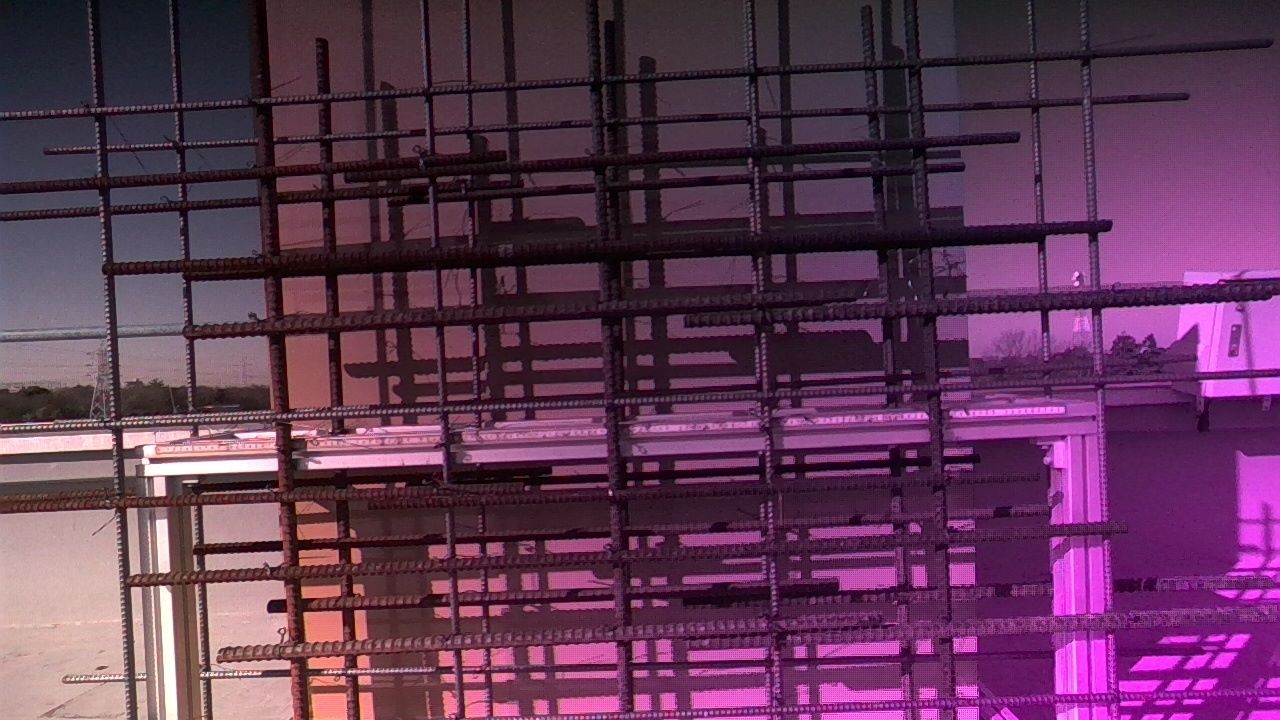
-
Hi Hiroki Nakamura Js You could test whether the 'RGB from left infrared' RGB mode is able to produce an RGB image that does not have this issue. Details for testing this mode on a computer in the RealSense Viewer tool can be found at the link below.
https://support.intelrealsense.com/hc/en-us/community/posts/25169259309331/comments/25176734324371
If you need to use the RGB sensor for your application then page 8 (the final page) of a PDF document that can be downloaded at the link below provides advice on possible solutions for the purple hue issue.
https://www.intelrealsense.com/download/13629/
This advice includes adjusting FPS, saturation and exposure time, or placing a physical ND Filter product over the lens on the outside of the camera.
Please sign in to leave a comment.
Comments
1 comment