A shadow exists when the color is aligned with the depth image.
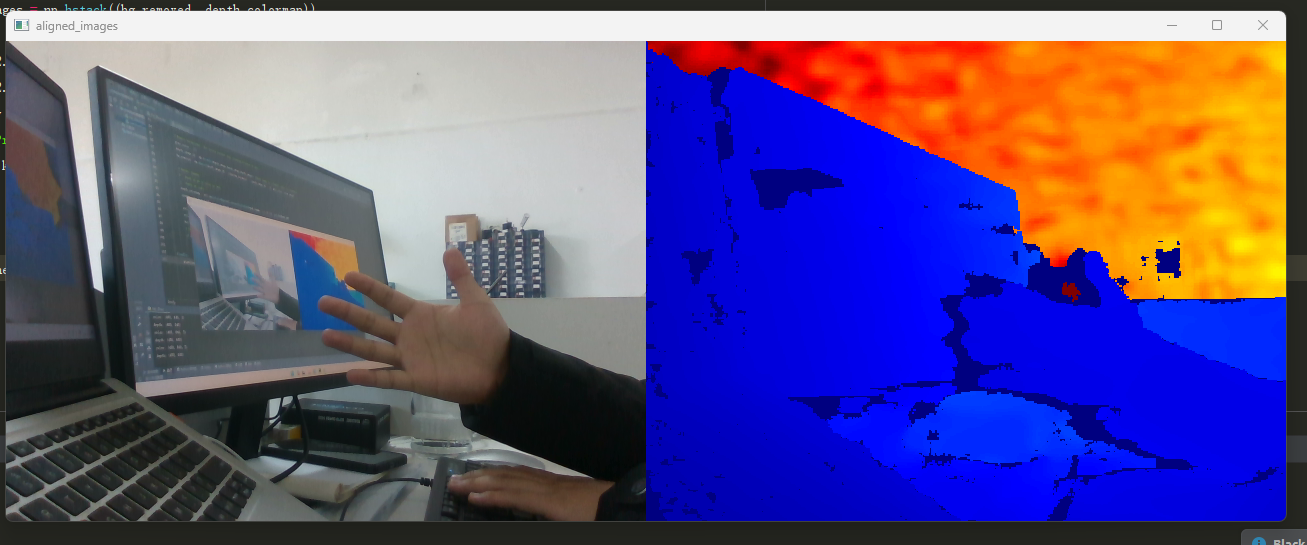
Hello, I have a problem in color and depth image alignment. Why is there a dark shadow on the edge of my hand in the depth image as shown below? Is it because there are errors in the internal and external parameters of the camera calibration? If so, what should I do?
-
Hello, the shadow is a phenomenon called occlusion and is caused by the depth sensors and RGB sensors being in different physical positions on the front of the camera. It is especially noticeable when observing arms and hands. The shadow typically becomes smaller as the arm / hand is moved away from the camera and larger as it is moved closer to the camera.
Performing a calibration of the camera may help to reduce the occlusion shadow, You could also try resetting the camera to its factory-new default calibration in the RealSense Viewer tool using the instructions at the link below.
https://github.com/IntelRealSense/librealsense/issues/10182#issuecomment-1019854487
A strong occlusion shadow on the arm / hand is a common phenomena though, so you may not be able to completely remove it.
-
MartyG, thank you so much for your reply! I have one more question: If the calibration can eliminate this effect and make the color and depth image alignment better, I plan to do a calibration myself. But I'm using a D435i camera - there are two infrared sensors and one RGB sensor. How can I use Matlab checkerboard calibration to complete the calibration? My idea is to do binocular calibration for the left and right infrared cameras, and then do monocular camera calibration for the RGB cameras alone. Is that right? Also, how do I store the calibrated data inside the camera after the checkerboard calibration (I mean what official software)
-
I would not recommend using a non-RealSense calibration procedure, especially as such tools are unable to save the calibration into the camera hardware whilst the official tools can.
If you need to calibrate both the depth and RGB sensors then the official Dynamic Calibration tool and its print target is likely to best meet your needs. It can be downloaded and installed for Windows at the link below, or installed on Linux using installation instructions on page 14 onwards of the tool's user guide.
Dynamic Calibration tool
https://www.mathworks.com/help/vision/camera-calibration.html
User Guide
Calibration print target
https://dev.intelrealsense.com/docs/dynamic-calibration-print-target
-
Ok, thank you! You said that dynamic calibration can be used to correct the internal and external parameters of color and depth sensors, so what does self-calibration do? How is it different from dynamic calibration? In addition, I also need to detect the accuracy of the depth value of the camera and calibrate the deviation. So, what method or experiment should I use to detect the accuracy of the depth value and make necessary correction when there is an error?
-
The On-Chip self-calibration tool only calibrates depth and not RGB. It does not need to be installed as a separate software package though as it is built into the camera firmware driver.
The On-Chip tool improves depth image quality, whilst the Tare calibration tool is used to improve depth measurement accuracy. Both tools can be accessed from the drop-down menu of the More option near the top of the RealSense Viewer's options side-panel.
-
Calibration typically improves the visual quality of a depth image and may correct obvious errors on the image such as a curved surface when a flat wall was scanned.
The On-Chip calibration system provides a health check score value after calibration. The closer to zero the value is, the better the calibration. The result also provides helpful descriptions such as excellent, good or could be better. You can repeat the On-Chip calibration as often as you wish to try to improve the calibration score before saving a particular calibration to the camera once you are satisfied with the score.
-
Calibration typically improves the image and may smooth out visual errors / distortions. Depth distance values may be improved as an indirect side-effect of this improvement in depth image quality. Unless the Tare tool was being used though, I would not perform calibration with the expectation of an improvement in depth measurement accuracy.
Please sign in to leave a comment.
Comments
10 comments