D445 - depth camera with problem
Hi, we are having two issues with the D455 realsense cameras.
First, one: We have 3 cameras at the same distance from the object; 2 of them are detecting a depth of around 2300 and the other one detects a depth of 4600.
The second problem: one of our cameras starts to send depth values of zero after some time. When we turn on the camera it works fine for a week (or some time) and all of a sudden our depth images are 90% zeros. To fix the problem we have to restart the camera.
-
Hi Nrodrigues If you have access to the RealSense Viewer tool, please try resetting the camera with the incorrect distance value to its factory-new default calibration using the instructions at the link below.
https://github.com/IntelRealSense/librealsense/issues/10182#issuecomment-1019854487
Regarding the zero depth values after a week: RealSense 400 Series cameras are designed to run indefinitely so long as they remain within the recommended operating temperature. Officially this is 35 degrees C, though in practice the 'ASIC temperature' can go as high as 42 degrees C before problems with the image may manifest above that point.
If the depth image is 90% zeroes then it would be worth checking whether the ASIC temperature has exceeded 60 degrees C after the problem has occurred. This would cause the laser safety mechanism in the camera firmware driver to shut off the camera's laser. The camera would continue to operate but the depth image quality and the amount of detail on it may be greatly reduced.
The ASIC temperature can be monitored in the options side-panel of the RealSense Viewer.
-
If dust was settling on the camera lenses then I can foresee that it could negatively affect the camera's perception. If all of the cameras were in the same environment though then I would expect all three cameras to experience a similar problem. Also, if the lenses were obscured by dust then the problem should still be present when the camera is restarted. So it seems unlikely that dust is the cause in this case.
Are the three cameras all observing the same area of the object (like a vertical stack of three cameras) or positioned around the object, observing different sides of it? If they are observing different sides then one camera might return a greatly different distance measurement if it had difficulty reading that side's surface because it was highly reflective or colored dark grey / black.
-
Hello again,
This image from your SW shows 2 cameras. Above you have a good camera depth result and below you see the result from the camera with problems of Depth.
This happened a few minutes ago.
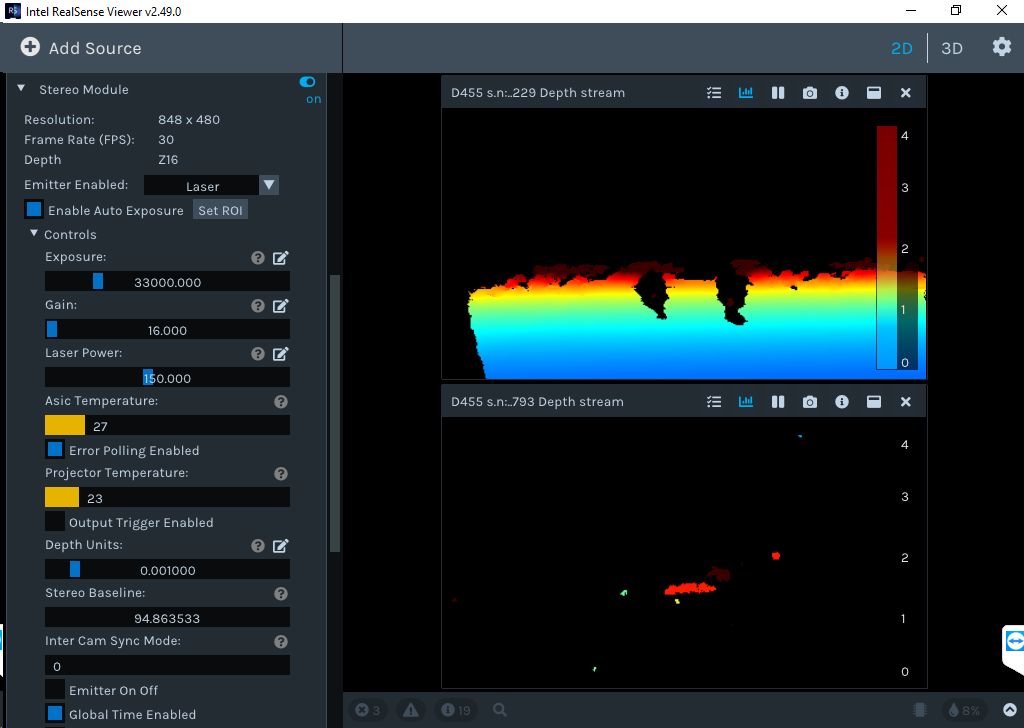
IF we disconnect the cable and connect again we solve the problem until next time.
Can you give feedback about this? Thank you.
-
I see that you are using the old Viewer version 2.49.0. The current version at the time of writing this is 2.54.1. When using 2.49.0 the recommended firmware driver version to be installed in the camera is 5.12.15.50. Do both of your cameras have this firmware, please? Using newer firmware than the ones recommended for a particular Viewer version can cause instability and errors.
Are both of the cameras on a USB 3 connection? The bad depth image suggests that this camera's exposure value might have dropped to minimum, perhaps because it has directly faced a strong light source such as the sun. In a past case at the link below where exposure dropped to minimum, the camera's auto-exposure did not automatically recover the image unless on a USB 3 connection.
-
Hi,
I have all cameras with the lastest firmware. I have 4 cameras connected to an PEXUSB314A2V2 4Port USB3.1, with SATA power connection enable.
Two more cameras I have connected diretly to USB3.1 motherboard ports.
My new problem is that one or more cameras dessapear. See the image from windows with only 4 cameras.
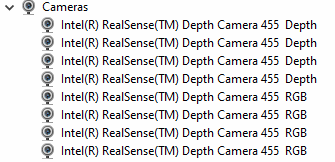
I only fix the problem unpluging the cameras.
I read old posts from 2019 that guys had connections down problems, like mine today.
-
The SATA board and the USB ports will all be drawing power for the cameras from the computer's power supply unit (PSU) so the more cameras that are added, the greater the overall power draw will be and the greater the risk of there being insufficient power for all cameras.
If your project is able to use a mains electricity powered USB 3.2 hub to put some of the cameras on then that will provide more stable power delivery to the cameras than having them all draw on the computer PSU and there should be sufficient power for all of the cameras.
The greater the number of cameras that are attached to the computer, the more of the computer's available resources that will be consumed. So for 4 cameras, if they are going to be enabled simultaneously then an Intel Core i7 CPU or equivalent is recommendable.
-
In Intel's 2018 multiple camera white-paper guide they test 4 cameras with Amazon's own-brand AmazonBasics mains powered USB 3 hub. I have used that hub brand myself over the years since then and not experienced any problems with it.
Please sign in to leave a comment.
Comments
9 comments