D455 high dust enviroment
Hi!
I am working in a project that uses several D455 cameras. The environment where these devices will work is high humidity and high dust. I know that D456 are IP67, but the cameras are already bought, so we need to work with what we have.
I am also aware of the autoVimation enclosure, but its price is prohibitive.
I was thinking on getting a IP67 plastic box (for example https://www.amazon.ca/Joinfworld-Electrical-Weatherproof-Waterproof-Electronics/dp/B0CHHJ49QN), carve just the profile of the front of the D455, and then expose the cameras. This way the main body will be protected from dust and humidity, and the cameras won't have anything in front of them.
The dust is due to a ventilation system, that can be turned off before an image capture, so the air won't be dusty at that time. But my doubt is about the protective glass and the dust.
Have any of you ever used these cameras in such conditions? Do you think that the protective glass will get obscured by the dust?
Thanks!!!
-
Hi Gutierrezjuanlucas It is fine to place a RealSense camera inside an enclosure with a clear transparent window on the front, like the custom enclosure for an underwater project in the image below.
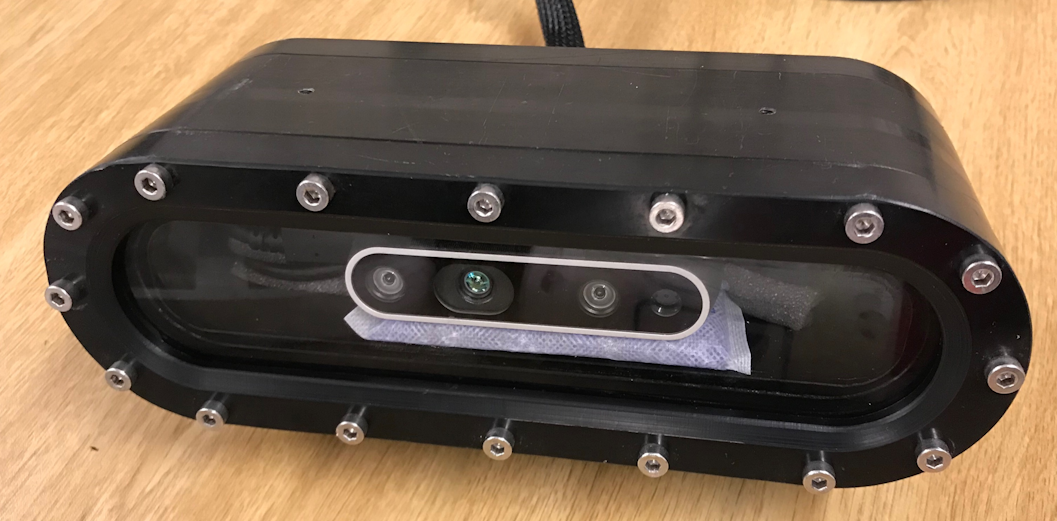
It is recommended that an anti-reflective coating be applied to at least the inner side of the window, as described in the link below, otherwise there could be back-reflections from the camera's laser that could be disruptive.
https://github.com/IntelRealSense/librealsense/issues/2566#issuecomment-431852571
It could certainly be a problem for the camera's vision if the front window was covered in dust though. Perhaps a small fan could be placed in front of the box and beneath it to direct air upwards to help keep dust away from settling on the window.
-
Hi Duke Zacks The camera should be calibrated for underwater use instead of the usual use in atmospheric air. The best available technical discussion about underwater calibration is at the link below.
https://github.com/IntelRealSense/realsense-ros/issues/1723
The discussion is so long and detailed that a lot of the information is hidden under a cut. So if you have not already read that case, I recommend entring the discussion at the link below and left-clicking on the Load More link under that linked-to comment, then returning to the start of the discussion.
https://github.com/IntelRealSense/realsense-ros/issues/1723#issuecomment-802741234
-
MartyG Thank you for the reply. What are the best lighting conditions for recording fish in a small aquarium, and how can I improve the video quality when using a RealSense D455 camera? I want to capture clear footage of the fish, so I'm looking for advice on optimal lighting setups, camera settings, or any additional tips to enhance underwater video clarity.
-
If you are using an RGB color image then I would recommend increasing the Sharpness RGB option to its maximum value of '100' for best RGB image clarity.
Also, if you are using the depth or infrared images then try increasing the depth Laser Power option to its maximum value of '365' to take account of lower lighting conditions when the camera is underwater. Maximizing Laser Power can improve depth image quality and make infrared images brighter. It will not affect the RGB image though.
If you have a D455 camera then you should get a better RGB image in darkened conditions if instead of using the RGB image, you use the Infrared image and set its format to RGB8 instead of the default Y8 format. This infrared mode is called 'Color from left infrared sensor' and will be able to take advantage of the brightening provided by maximizing Laser Power and will be able to see in darkness (the RGB sensor cannot see in the dark).
Please sign in to leave a comment.
Comments
8 comments