RealSense D415 and D405 Precision
Hi, I am currently using the Intel RealSense 415 camera to track motion at a close distance (in this case the closest being ~30 to ~40 cm. I am using Python to access the camera's depth frame to return a depth at points of interest to me, however the units only go to meters.
For the D415, can the depth frame return sub-millimeter precision? If not, can the D405?
Thanks!
-
Here is the code:
import pyrealsense2 as rsimport numpy as npimportcv2import matplotlib.pyplot as pltfont = cv2.FONT_HERSHEY_SIMPLEX
pipe = rs.pipeline()cfg = rs.config()
color_res = [1920, 1080]depth_res = [1280, 720]fps = 30crosshairsize = 2max_dist = 700min_dist = 450
cfg.enable_stream(rs.stream.color, color_res[0],color_res[1], rs.format.bgr8, fps)cfg.enable_stream(rs.stream.depth, depth_res[0], depth_res[1], rs.format.z16, fps)
color_path = 'rgb.avi'depth_path = 'depth.avi'
colorwriter = cv2.VideoWriter(color_path, cv2.VideoWriter_fourcc(*'XVID'), fps, (color_res[0],color_res[1]), 1)depthwriter = cv2.VideoWriter(depth_path, cv2.VideoWriter_fourcc(*'XVID'), fps, (depth_res[0],depth_res[1]), 1)
pipe.start(cfg)
depth_array = np.empty(0)depth_pixel = [int(depth_res[0]/2),int(depth_res[1]/2)]
def filter_depth(depth, time, max_dist,min_dist):for i in range(len(depth)-1,-1,-1):if depth[i] > max_dist:depth = np.delete(depth,i)time = np.delete(time,i)continue
if depth[i] < min_dist:depth = np.delete(depth,i)time = np.delete(time,i)continuereturn depth, time
while True:frame = pipe.wait_for_frames()depth_frame = frame.get_depth_frame()color_frame = frame.get_color_frame()
depth_image = np.asanyarray(depth_frame.get_data())color_image = np.asanyarray(color_frame.get_data())depth_cm = cv2.applyColorMap(cv2.convertScaleAbs(depth_image, alpha = 0.3), cv2.COLORMAP_JET)
depth_at_pixel = depth_image[depth_pixel[1],depth_pixel[0]]depth_array = np.append(depth_array, depth_at_pixel)
cv2.circle(color_image,(int(color_res[0]/2),int(color_res[1]/2)), crosshairsize, (0,0,255), -1)cv2.putText(color_image,'Depth: ' + str(depth_at_pixel) + 'mm',(10,100), font, 4,(255,255,255),2,cv2.LINE_AA)
colorwriter.write(color_image)depthwriter.write(depth_cm)
cv2.imshow('rgb', color_image)cv2.imshow('depth', depth_cm)
if cv2.waitKey(1) == ord('q'):break
colorwriter.release()depthwriter.release()pipe.stop()
time_per_frame = 1/fpstotal_time = len(depth_array) * time_per_frametime = np.linspace(0,total_time,len(depth_array))
depth_filtered,time_filtered = filter_depth(depth_array,time,max_dist,min_dist)
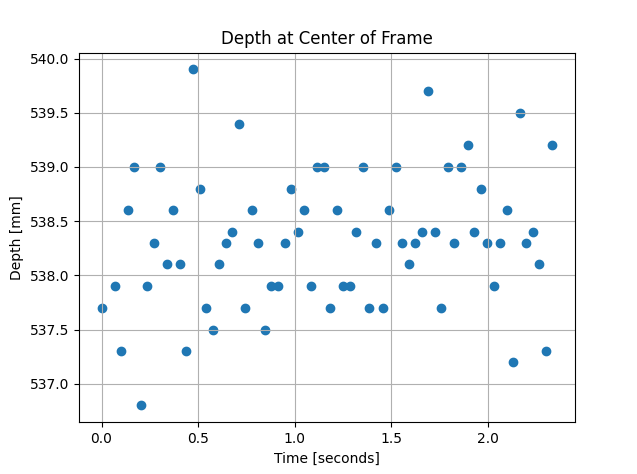
plt.scatter(time_filtered,depth_filtered)plt.xlabel("Time [seconds]")plt.ylabel("Depth [mm]")plt.title("Depth at Center of Frame")plt.grid(True)plt.show()
print(depth_image)
And an example of the frame I want to access submillimeter precision with.[451. 458. 464. 468. 475. 483. 487. 493. 498. 504. 505. 511. 514. 517.
517. 576. 568. 593. 588. 570. 566. 568. 567. 565. 567. 564. 561. 562.
560. 558. 552. 550. 553. 554. 556. 560. 560. 557. 555. 553. 552. 553.
558. 565. 569. 565. 539. 539. 540. 482. 470. 456. 528. 515. 486. 528.
509. 468. 465. 460. 462. 468. 476. 510. 543. 605. 520. 498. 481. 489.
485. 483. 482. 483. 480. 478. 477. 488. 500. 521. 553. 555. 560. 563.
527. 605. 603.] -
Hi Kvuong The RealSense D405 camera is the only model that is officially described as having sub-millimeter accuracy.
https://store.intelrealsense.com/buy-intel-realsense-depth-camera-d405.html
D405 is designed to provide high accuracy, high quality images at very close range. The ideal depth sensing range is 7 cm to 50 cm, though its minimum depth can go as low as 4 cm if the Disparity Shift option is used.
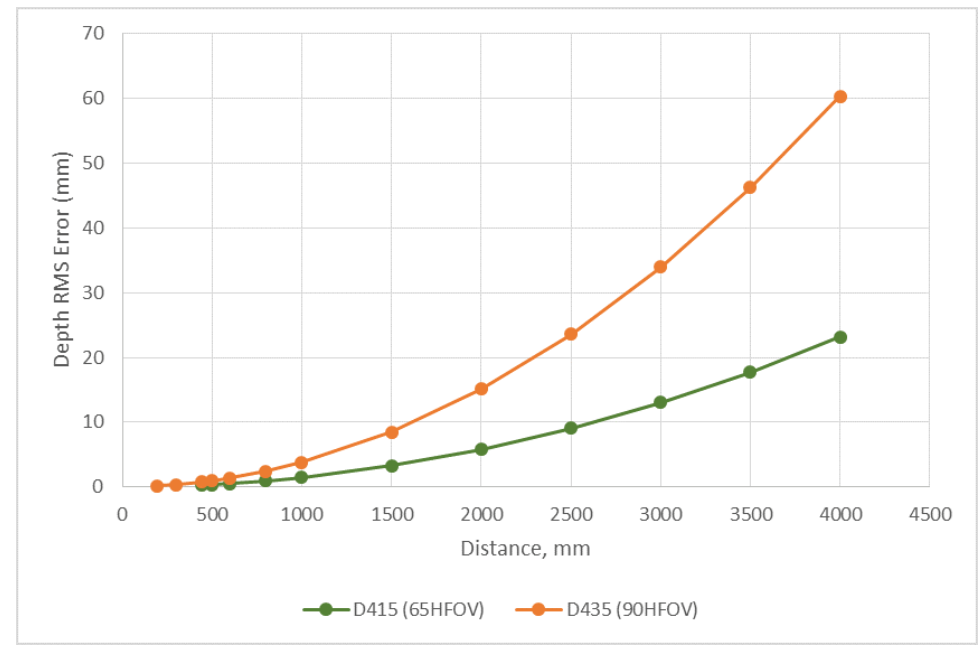
D415 can also provide high accuracy, low error images at distances below 1 meter. The D405 will be more accurate though as it is designed specifically to provide optimum results at those low distances. A chart demonstrating the error over distance of D415 is shown below.
-
RealSense cameras have a minimum depth sensing distance, below which depth data breaks up and then disappears. By default on D405 this minimum distance is 7 cm, so the depth image will only contain depth representing distances 7 cm or further from the camera. This minimum can be reduced down to 4 cm using the Disparity Shift option. But it is not possible to read the depth at 0.5 mm distance from the surface of an object.
-
Hi Marty, thank you for the response but my question is a bit different. I just want to make sure that the camera returns depth at .5mm increments (although in the main page it says .1mm increments? Depth Camera D405 – Intel® RealSense™ Depth and Tracking Cameras (intelrealsense.com)).
For example, reading an object at 10cm, i can retrieve through code 10.05mm, 10.10mm, 10.15mm, etc.
-
Thanks very much for the clarification.
You can customize the scale that depth measurements are reported in by changing the depth scale option. By default on D405, depth is reported in the centimeter scale (0.01 cm for every depth unit). This can be reduced to millimeter scale by changing the depth scale to 0.001 (0.001 millimeters per increment of depth).
0.0001 scale is the lowest that the D405 model can be set to. D415's depth scale can be set as low as 0.000001.
In the RealSense Viewer tool the Depth Scale option can be found under Stereo Module > Controls
-
The link below has Python scripting for changing the depth scale with the instruction rs.option.depth_units
https://github.com/IntelRealSense/librealsense/issues/10976#issuecomment-1271236193
-
Depth images generated by the D415 model have less depth noise than the D435 / D435i models and so D415 has around 2x less error over distance (known as RMS Error) than D435 / D435i.
A key difference between D405 and D415 though is that the D415 is equipped with a built-in infrared pattern projector whilst D405 does not have a projector. There is a phenomenon called laser speckle where the pattern of semi-random dots cast onto surfaces by the projector can add noise to the depth image.
You can test whether the D415's projector is negatively affecting results by disabling the projector. This can be done by setting the Laser Power option to a value of '0'. Python code for setting the Laser Power value can be found here:
https://github.com/IntelRealSense/librealsense/issues/9327#issuecomment-872907782
Please sign in to leave a comment.
Comments
13 comments