D435 Depth stream snap frames
I'm using D435 for deep inspection and I'm using an operating system that is Raspberry Pi 4B Ubuntu 18.04. When the camera is used alone, the depth stream can be transmitted normally, the color stream and the depth stream are changed in real time, and there is no problem detecting obstacles. But after starting the DJI drone M100, the camera's depth stream gets stuck in one frame and changes after a long time, but the color stream changes in real time as the camera angle changes.
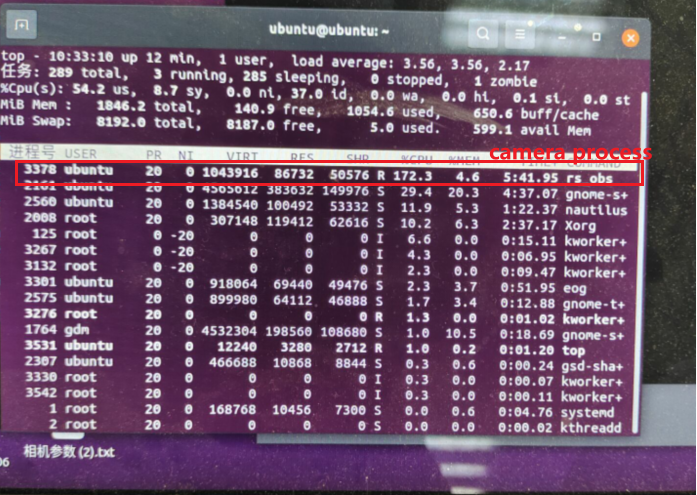
Not sure if it has anything to do with CPU usage, the Raspberry Pi is a quad-core CPU, with 400% of the total CPU resources, the drone's process occupies about 50%, and the camera process occupies about 170%.
-
Hi Avensc If the camera works normally until the drone is started and the camera is mounted on the drone, could you first check please whether severe vibration is being transmitted from the drone's frame to the camera through the camera's mounting point? Whilst the stereo depth algorithm of the 400 Series cameras is robust against vibration, severe vibration may have a disruptive effect.
-
The problem I had was that after starting the drone, the depth stream of the camera appeared to jam, but the color stream was normal. Previously, I embedded the camera's code into the drone, separated as a thread in the drone's process, and the above stuck frame phenomenon always appeared. Later I tried to separate them, it was normal to get the camera's depth stream and color stream separately, but as soon as the drone's process was started, the depth stream would immediately appear jammed, even if they were unrelated (as two separate processes), there was no data transmission between them, only running on the same platform. I speculate that it could be a CPU usage issue or that the deep stream port is blocked for unknown reasons. The API I use to get image frames is wait_for_frames().
-
The camera should definitely not be consuming 170% of the CPU's usage. For two simultaneous streams (depth and color), 70% would be a more reasonable expectation. I would be concerned if the overall CPU usage (camera and drone processes) was 100% or slightly more.
400% sounds as though the Pi is getting stuck on a particular process and cannot escape from it. I note from your image that there is '1 zombie' process. A zombie process is a dead process that has not been removed. This is likely to be the 'rs obs' process that you highlighted in red.
If the camera works normally when the drone process is not active then it is reasonable to assume that your RealSense scripting does not have a problem.
-
Thank you for your patient reply. rs_obs is a camera process that starts, not a zombie process. The current problem is that the color map is displayed normally, but the depth map will be stuck in the previous picture, and the color frame and depth frame have been aligned with align, the API I currently use to block the receiving frame is wait_for_frames(), is there any solution, can I synchronize the color frame and the depth frame, thank you very much.
-
As your script works normally when the drone process is not running, it does not seem as though there is a problem with your RealSense code. However, it may be worth starting the drone and then running one of the SDK's pre-made depth-color alignment example programs to see whether they are affected in the same way as your own script.
C++
rs-align
https://github.com/IntelRealSense/librealsense/tree/master/examples/align
Python
align_depth2color.py
If you included the SDK examples and tools when you installed librealsense then you should be able to launch a pre-built version of rs-align. The pre-built examples can be found in the usr/local/bin folder of Ubuntu if the SDK has installed them.
Please sign in to leave a comment.
Comments
5 comments