Auto exposure limits
Hi,
I would like to ask if it is possible to use the auto exposure but including a max value to avoid blured images at low light conditions.
So, for example using auto-exposure but limiting the maximum possible exposure time to 1ms.
Regards,
Cristian
-
Hi Cristian Vilar The RealSense SDK has supported an Auto-Exposure Limit for the IR sensors since SDK 2.42.0. Does this feature fit your requirements, please?
https://github.com/IntelRealSense/librealsense/wiki/API-Changes#version-2420

The Auto-Exposure Limit feature can be set in the RealSense Viewer at the bottom of the Controls section of the Viewer's 'Stereo Module' options.
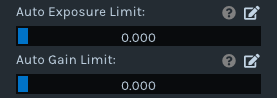
-
Your MATLAB sensor querying code looks similar to the code in the link below.
https://github.com/IntelRealSense/librealsense/issues/7102#issuecomment-673623848
Does your script follow that links's example in setting up sensors{1}{2} first before calling it in your realsense.option lines, please?
sname = sensors{1}{2}.get_info(realsense.camera_info.name);
disp(sname);An alternative to using index numbers to distinguish between depth and RGB sensors is to define a sensor as 'first depth sensor' or 'first color sensor'. The link below provides a MATLAB wrapper example of doing so for the depth sensor:
https://github.com/IntelRealSense/librealsense/issues/3358#issuecomment-475489478
In regard to a limiter for RGB exposure, I am not aware of a way to implement a similar maximum exposure control for the RGB sensor.
-
Hi MartyG,
Yes, I tried both methods and Exposure limit is not working in both sensors (depth & RGB)
dev = profile.get_device();
depthSensor =  dev.first('depth_sensor'); %color sensor also tried
depthSensor.set_option(realsense.option.enable_auto_exposure,0);
depthSensor.set_option(realsense.option.auto_exposure_limit,156);
dev = profile.get_device();
sensors = dev.query_sensors();
sname = sensors{1}{2}.get_info(realsense.camera_info.name); % {1}{1} RGB also tried
disp(sname);
sensors{1}{2}.set_option(realsense.option.enable_auto_exposure,0); % {1}{1} RGB also tried
sensors{1}{2}.set_option(realsense.option.auto_exposure_limit,156); % {1}{1} RGB also tried
regards,
Cristian
-
depthSensor.set_option(realsense.option.enable_auto_exposure,0); should be set to '1' instead of '0', as 1 enables auto-exposure and '0' disables it.
And of course, Auto_Exposure_Limit will not work with the color sensor.
I researched for further examples of MATLAB wrapper code for accessing the depth or RGB sensor individually but could not locate any, unfortunately.



Please sign in to leave a comment.
Comments
7 comments