I have question about intelrealsense D435, how can i get depthmap only face to train model.
I have question about intel realsense D435, How can i get depthmap only face to train model.
How i can show only face with depthmap as pictures below.
-
Hi Hvtrung The link below provides details of how a face data-set called CASIA-SURF was created using a facial 3D reconstruction tool called PRNet. Would this meet your needs, please?
https://github.com/IntelRealSense/librealsense/issues/8472#issuecomment-788737796

-
I carefully considered your question. If you want a depth-only plain face capture (no color texturing), you could certainly do so in the RealSense SDK with your D435. The SDK's RealSense Viewer tool has a pre-made 3D point cloud mode that enables a minimum and maximum depth distance to be set so that you can isolate the face from the rest of the scene and then export the point cloud data as a .ply format file.
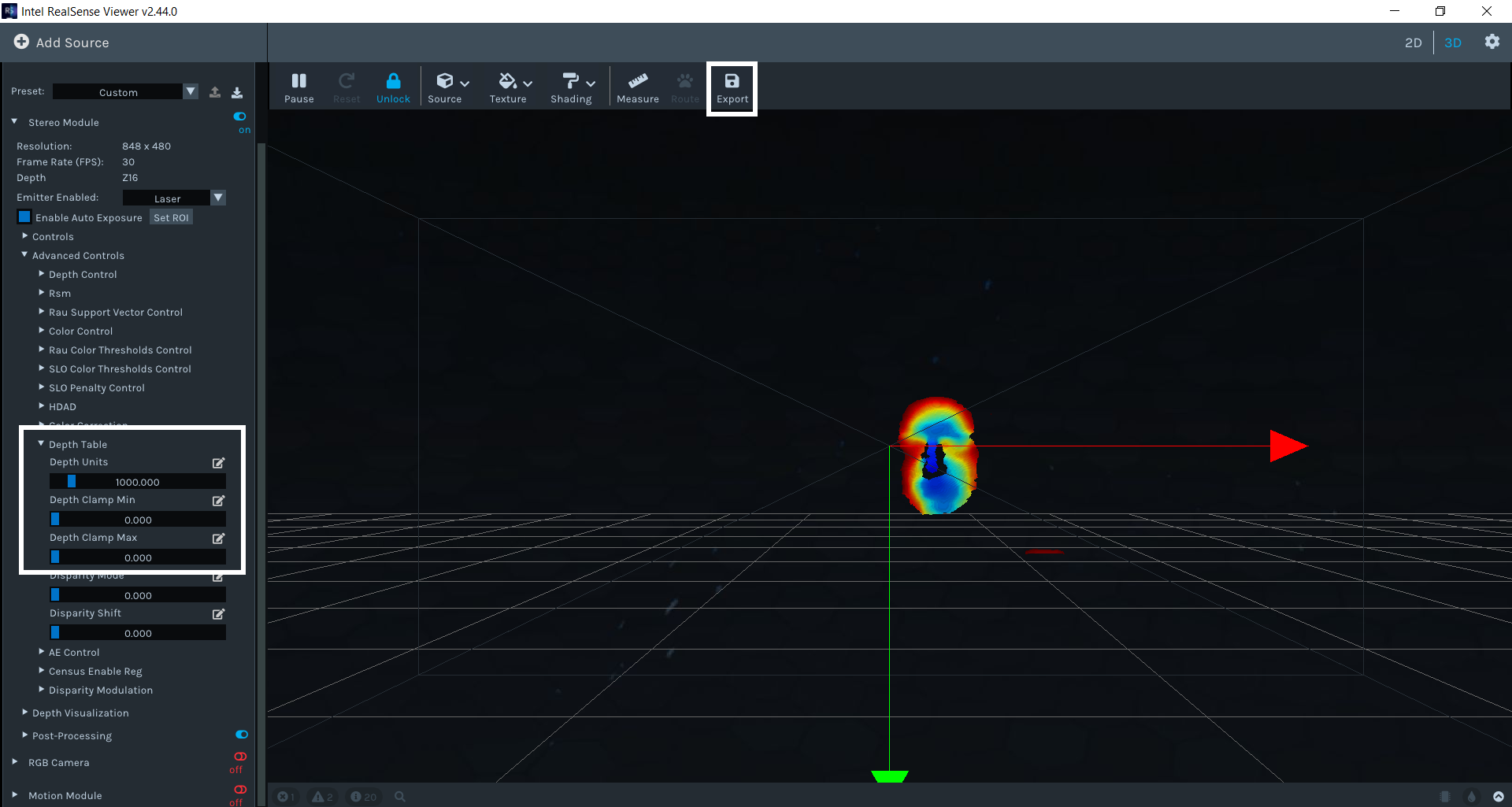
Once a ply file has been obtained then it can be imported into a 3D modelling software package and converted into a solid mesh model that more closely resembles the plain face in the image that you provided. The free software MeshLab can perform this conversion, as described in a tutorial in the link below.
https://www.andreasjakl.com/capturing-3d-point-cloud-intel-realsense-converting-mesh-meshlab/
-
Thank you very much for your help, please more question.
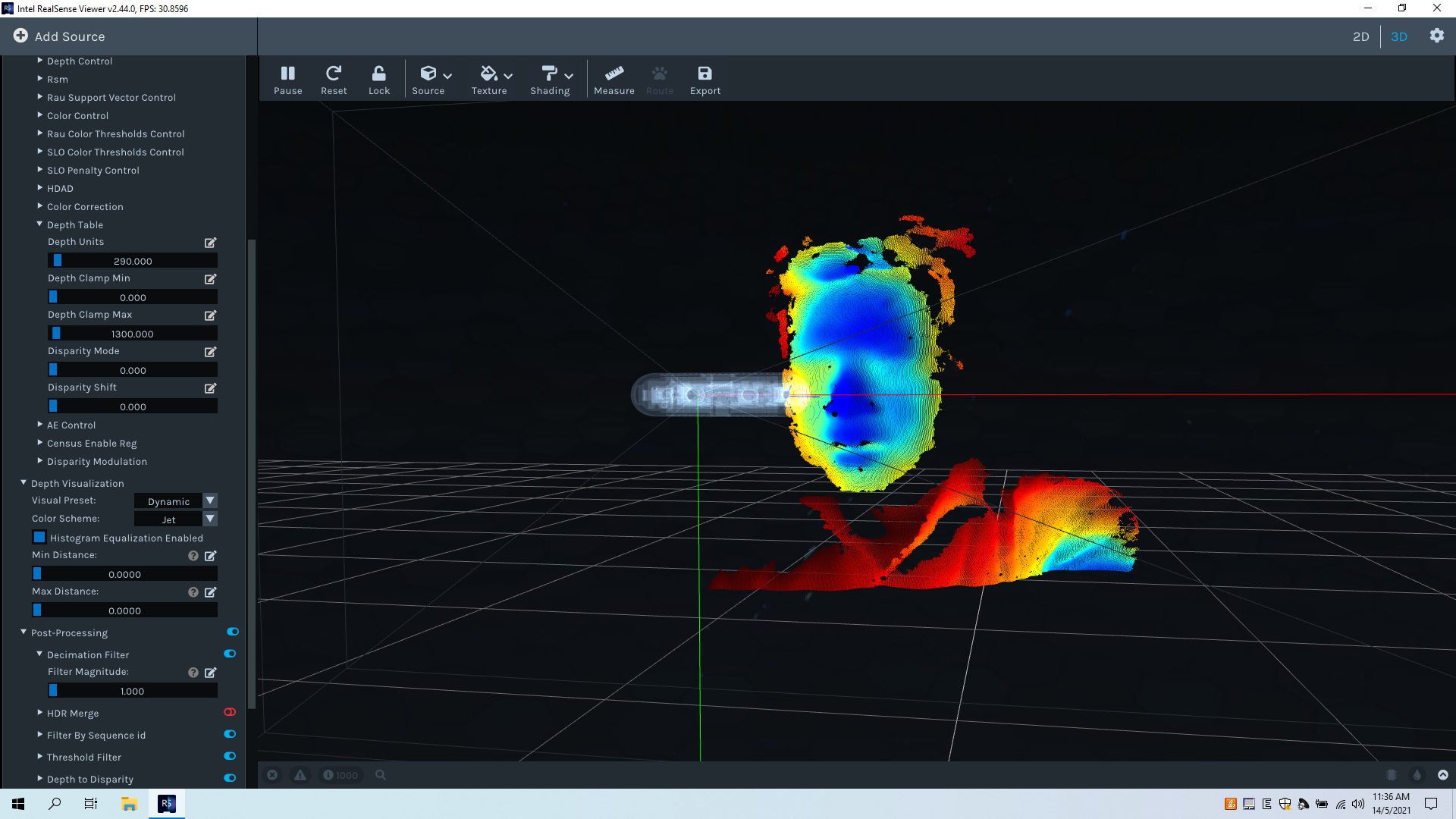
1.How can i get only face with parameter that you show me, now i get result but, more detail not necessary as shoulder... picture below
2. After get depthmap of face with this solution (intel d435). can i store data face with numpy to train model with PyTorch. my project us Facenet combine deptmap of face to improve accuracy.
Sorry my English not good, am Viet Nam.
-
Your English is very good, so don't worry.
It would be difficult to remove the shoulders from the image using the RealSense Viewer tool as they are the same distance from the camera as the face. What I did was to simply position the camera at a height where the shoulders were not captured.
If you are creating all of the images yourself from your own body then wearing a black shirt may remove depth detail below the neck. This is because depth cameras have difficulty seeing black surfaces because they absorb light.
It would likely be possible to remove the shoulder detail from the image in real-time using filters in PCL but a simpler solution would be to export a ply file from the RealSense Viewer that includes the shoulders and then remove the unwanted detail in MeshLab when creating the final version of the image.
https://en.m.wikiversity.org/wiki/MakerBot/Cleaning_Up_Point_Cloud_Meshes_in_Meshlab_For_3D_Printing
If you need to store the facial depth data in numpy though, I wonder whether a Python script in the link below for saving the depth into an npy file would be suitable for your project.
https://github.com/IntelRealSense/librealsense/issues/4934#issuecomment-537705225
You may then be able to load the npy file into pytorch.
https://towardsdatascience.com/beginners-guide-to-loading-image-data-with-pytorch-289c60b7afec
-
Im so happy when i recive answer from you. please for me two question.
Now I got two result as picture below with two solution.
PRN (https://github.com/IntelRealSense/librealsense/issues/8472#issuecomment-788737796 ) and IntelRealsense D435
if i use D435, i feel depthmap of face lost many information, (1) how can i fill lost depth pixels as picture below(round yellow).
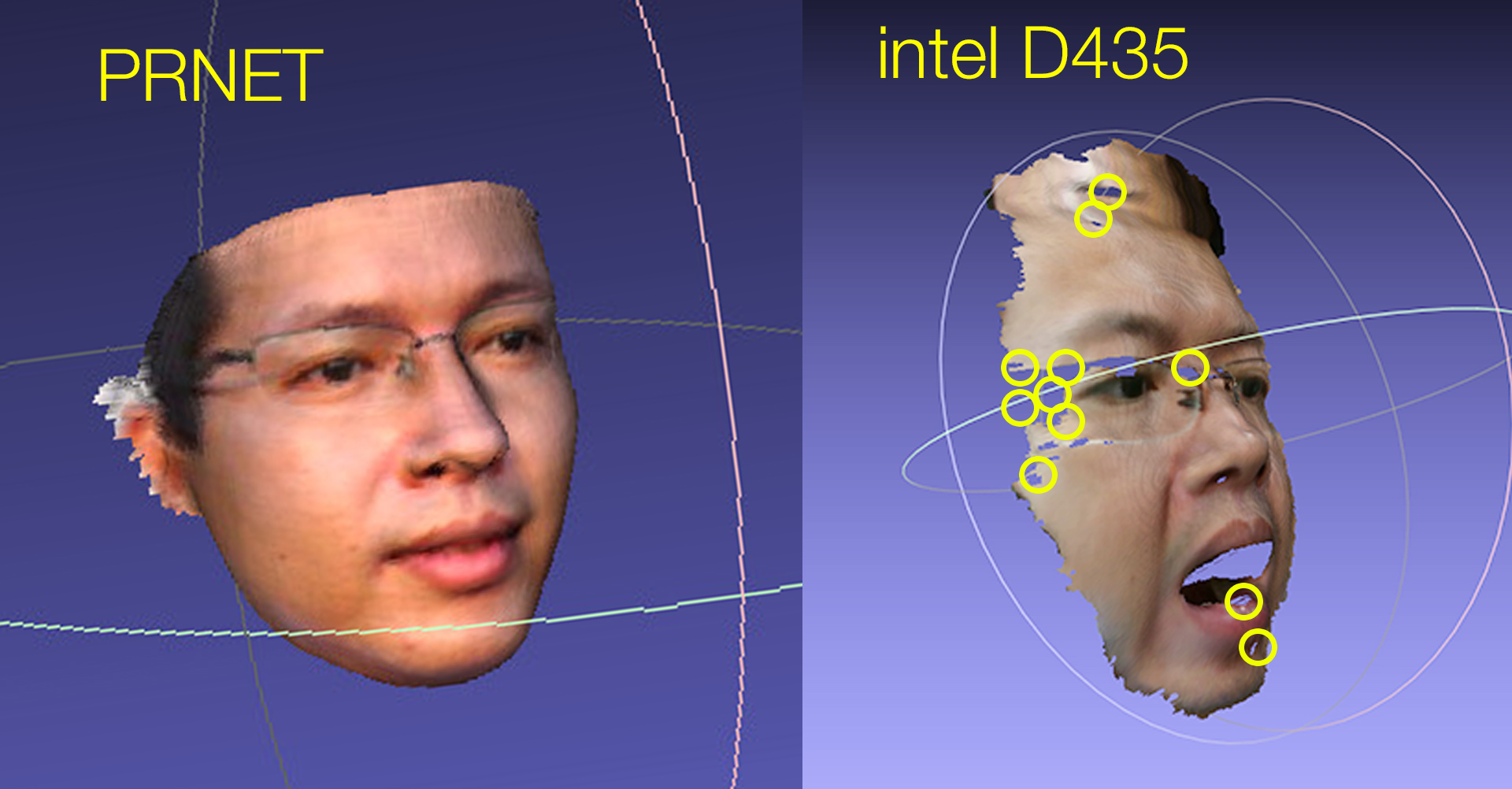
(2) Which technology do you think is better, give me some advice.
Thank you very much.
-
1. The D435 image may be losing some depth information around the marked points because of light reflections off the spectacles and areas of skin such as the forehead. You could try capturing the image without spectacles to confirm this possibility if the depth detail around the eye improves.
The area of black hair at the side of the head may be missing due to the camera having difficulty seeing black or dark grey colors due to the physics of light, as mentioned earlier.
Putting a fine powder such as talcum powder on the face may dampen reflections and make the face more readable. This technique works for dampening reflections when applying fine spray-on powders such as foot powder or baby powder to reflective surfaces that are being scanned.
Glare from reflections on images can also be dampened by applying a physical optical filter product called a linear polarization filter over the lenses on the outside of the camera, though this may not be necessary for your particular application if you are creating all the images using your own face.
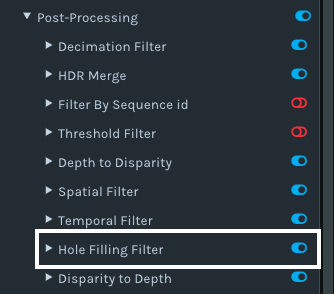
You could also test whether enabling a post-processing filter called a Hole-Filling Filter in the RealSense SDK fills in the gaps.
2. The best method will be the one that is compatible with the workflow of your project. For example, the PRNet image above may be better but this is not helpful if PRNet cannot be used to generate numpy information to transfer into pytorch.
-
If the goal of your project is to develop an accurate face detection and recognition system then you may be able to save a lot of time and work if you use the new RealSense ID system and its RealSense F455 device instead of a D435 depth camera.
-
Thank for your help, But this my disserdation of master science. It have to more research in nature. So cannot buy device supported good funcion.
I searched found paper about my problem (https://www.researchgate.net/publication/342352744_Deep_Learning-based_Single_Image_Face_Depth_Data_Enhancement) but can not see instruction or link code via github.
Please for me question if i use depthmap D435 with lost many depth pixel as myresult. This affect to accuracy of my recognition system or tool enhance depthmap face can you show me. Thank you very much
-
The appendix at the bottom of the paper that you linked to provides a link to a GitHub article about depth enhancement.
https://github.com/mdcnn/Depth-Image-Quality-Enhancement/
The appendix also has a GitHub link for dealing with occlusions (when something is in front of the face, obscuring the facial features)
-
Thank for your help.
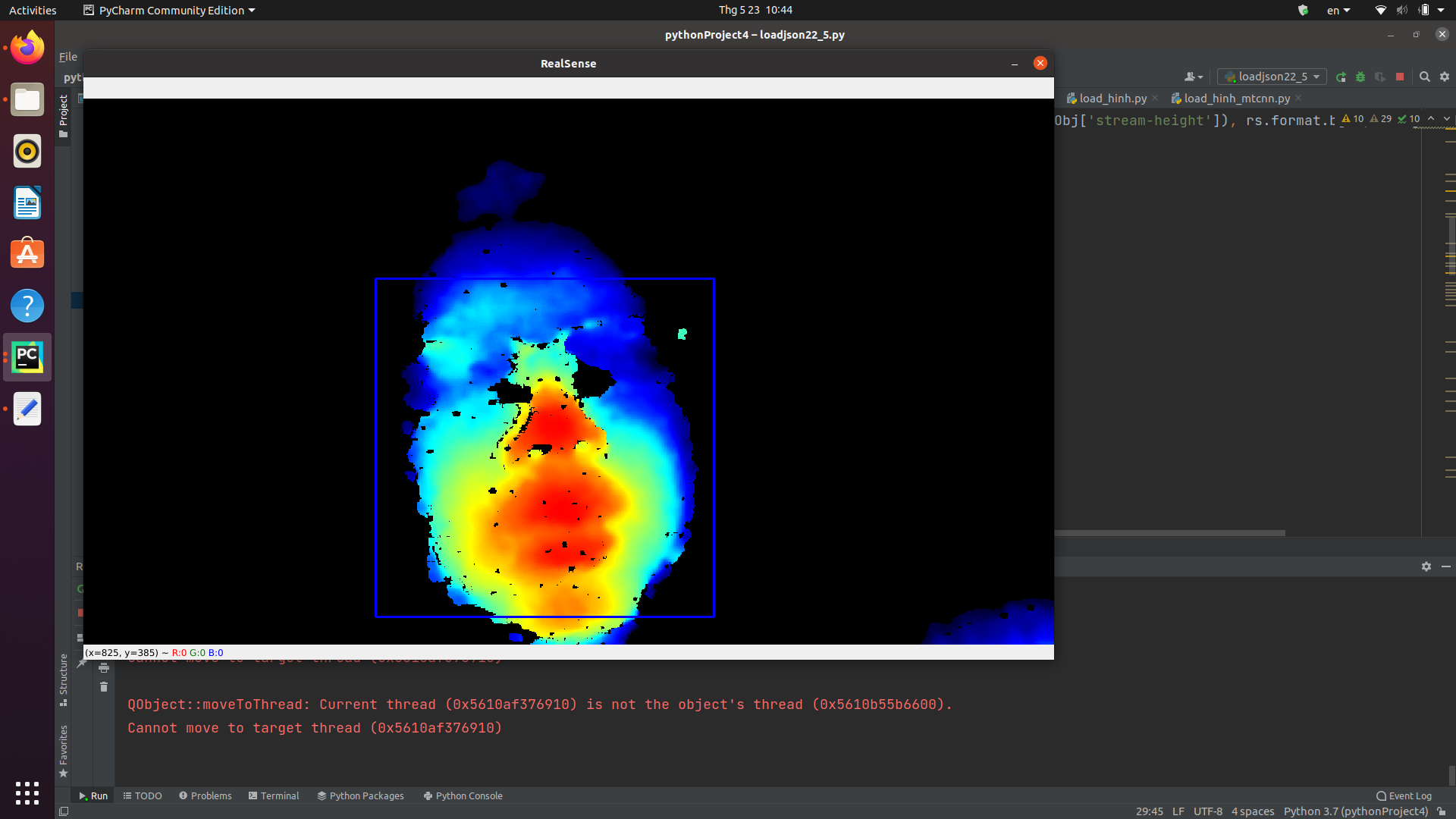
Now i found solution for my problem about depth face. Please for me question. how can i to detect face on stream with MTCNN that use intel D435 camera? when i use single image MTCNN word good but I use real time it not working.
I using DLib and it ok picture as below, but i want use MTCNN to compare Dlib and MTCNN but it cannot word please help.
-
In regard to comparing MTCNN and dlib, the link below may be helpful:
Please sign in to leave a comment.
Comments
14 comments