Not able to use wrappers [C#, python]
I'm having some problems trying to use the camera with C# or python. After that the installation is completed I can test C++ sample codes and all of them runs smootly, but if I move to to the wrapper folder the solultion RealsenseWrappers is there, with no project in it.
I have to admit that I'm far from being and expert, I only know the basis of programming, so if my question seems to be naive, that why.
-
Hi Damiano Scibilia Each wrapper has its own method of installation.
C#
https://github.com/IntelRealSense/librealsense/tree/master/wrappers/csharp#building
Python
https://github.com/IntelRealSense/librealsense/tree/master/wrappers/python#installation
If Windows is being used then a selection of the most widely used RealSense wrappers can be set up during the SDK installation process with the automated Windows SDK installer file available from the Assets file list on the SDK Releases page.
https://github.com/IntelRealSense/librealsense/releases
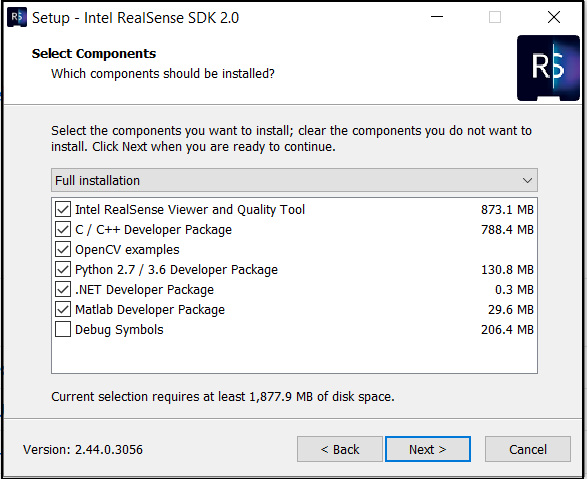
-
Thank you so much MartyG you really helped me out. Using the guide for C# i was able to set up the program and run some example code, but about the installation of python i had some problems: the guide says that in cmake-gui the option
BUILD_PYTHON_BINDINGSshould be selected, but I can't find it in the gui.Thus I tought it should be done from command prompt, and so I runned this sequence of command:
1) i moved to the following folder
C:\Users\<my_name>\Desktop\librealsense>
2) create the build folder and move into it
mkdir build_python
cd build_python
3) run cmake from terminal for the building procedure
C:\Program Files\CMake\bin\cmake.exe .. -DBUILD_PYTHON_BINDINGS=true
After this procedure I should get the solution librealsesnse2.sln, which I have, and the project pyrealsense2 has to be compiled. In the output folder I should find some files named pyrealsense2.pyd and realsense2.dll, but none of these file exists in the build_python folder which I created (to be sure of that I searched in the folder using the windows file manager).
-
If you have installed the SDK on Windows using the installer file then you can obtain pre-built versions of these files from the SDK folder location below:
C: > Program Files (x86) > Intel RealSense SDK 2.0 > bin > x64
If you are using Python 2.7 then use the pyrealsense2.pyd file in this folder. If you use Python 3.6 then use the folder's pyrealsense2.cp36-win_amd64.pyd file.
If you are using a Python 3 version newer than 3.6 then use the pip install pyrealsense2 method to install the wrapper via Pypi, or build it from source code to create a pyrealsense2 pyd file for your particular Python 3 version.
As mentioned in the installation guide, a pyrealsense2.pyd file generated for Python 3 will have a more complex filename, like the pyrealsense2.cp36-win_amd64.pyd filename above. The filename will reflect the Python 3 version that you are using, such as cp37 for Python 3.7 and cp38 for Python 3.8.
Please sign in to leave a comment.
Comments
3 comments