Strange streaming shown in RealSense-Viewer for RGB camera in 3D
| Information | |
|---|---|
| Camera Model | D435I |
| Firmware Version | 05.12.12.100 |
| Operating System & Version | Ubuntu 18.04.5 LTS bionic |
| Kernel Version (Linux Only) | (Linux version 4.15.0-140-generic |
| Platform | Dell laptop |
| SDK Version | 2.44.0 |
| Language | Have not started coding yet, just using realsense-viewer, but probably python or C++ |
| Segment | Other |
Issue Description
I have a recently purchased RealSense D435I camera and I am a bit worried that it is not functioning properly. I have installed on both Windows 10 and Ubuntu 18.04.5 LTS bionic. It is slightly better on the linux laptop as some of the 3D RGB stream is showing. Nothing for the 3D RGB stream was showing on Windows. The camera is plugged in and the RealSense-viewer app is the only application running on my laptop.
Here is the stream result:
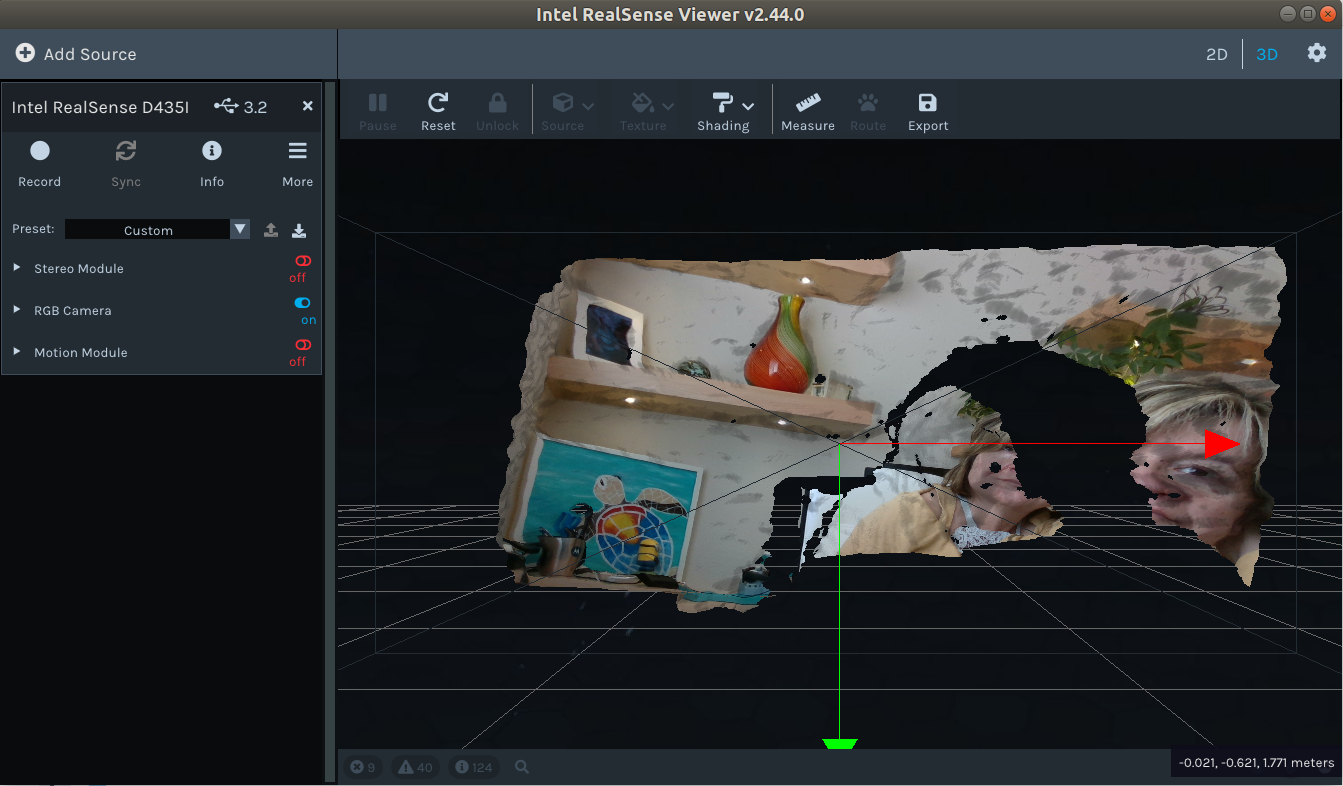
2D seems to work just fine. Should I return/exchange this hardware?
Thank you in advance for your help with this issue.
Sheryl
-
Hi Sheryl Leduc Judging by the RealSense Viewer image that you have kindly provided, the Viewer is functioning in Windows as expected and the camera is not faulty. The 3D mode is for generating a type of depth scan made up of three dimensional coordinates called a point cloud. Because depth is the most important type of data in this mode, the RGB stream on its own will not function properly in the way that it does in 2D mode.
In 3D mode, the role of RGB color is to be optionally mapped onto the depth points to create a combined textured point cloud. It is also fine to have RGB disabled in 3D mode and have a point cloud based solely on depth data.
So it is normal for the RGB image to appear non-functional in this mode when depth is not enabled.
If you use RGB in the 2D mode then it should work fine, as you mentioned.
-
MartyG. Thank you so much for the quick response and the explanation! I did not realize that it would look this way. I will continue on to programming with the SDK :)
Please sign in to leave a comment.
Comments
2 comments