Intel D415: Missing depth information near edge of camera
Hello everyone,
I have recently purchased a D415 camera. I have done some closer testing with it, and there appears to be a strange artifact. Along one side of the image, The depth information is missing. At this region, the depth information cycles between 0 and a very large, random number ~2m. Here is an image of the camera output from the RealSense Viewer (focused on a plain white wall):
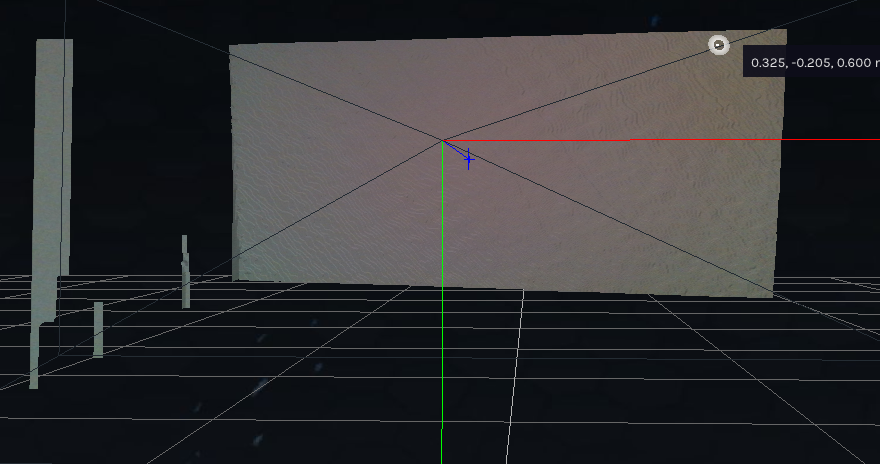
I have tried to perform the on chip calibration as this was my first thought to solve this issue. Running the on-chip calibration returns many null pointer errors, alongside a message that a stream was unreachable.

None of these issues occur with my old D435 camera. Any suggestions would be greatly appreciated. Thank you.
-
Hi Gfrank If the missing data is a side wall, does it appear on the image if you turn the camera towards it instead of pointing the camera straight ahead? The size of the field of view on the D415 model is smaller than the D435 field of view, meaning that it can see less of the outer edges of the scene that it is observing.
-
Hi MartyG, thank you very much for your response. I don't believe it is a field of view issue, the problem occurs regardless of what I am imaging or the angle of the camera. I am developing through the Python SDK, and have noticed that after collecting the color and depth frames and aligning them, there is an ~60 pixel band across the left side of the image that does not have depth information (i.e. 0 mm or ~6,000mm) regardless of what I am imaging, the distance of the camera to the object and the orientation of the camera. I am using a hole filling filter, so holes should not exist in the depth image. This does not occur with the D435 camera using the same code.
-
Could you compare your depth image in the Viewer's 2D mode to the one in the link below to see whether it has a rough edge of empty depth all the way down the left side please? If your 2D depth image in the Viewer does resemble this, it may be an Invalid Depth Band.
https://support.intelrealsense.com/hc/en-us/community/posts/360053086413/comments/360014074814
Please sign in to leave a comment.
Comments
3 comments