Multi People Tracking
I need to track people in video captured by my D415 ... Are there any source of information on how to use camera Instrinsics and extrinsics to get the the World XYZ coordinates based on image plane x,y and depth ?
I'm currently using YOLO model to detect people in a bag file and it's working perfectly in the work to detect people in the RGB stream ... but now i need to remap the coordinates to the world coordinates (in relation to camera depth sensor origin ...) .
Should i use get_extrinsics_to() to map the coordinate as i need ? Or DeProject () maybe ?
Getting the whole point cloud will be computational expensive ...
I'm using the Python Wrapper...
Is there any material i could use as a reference for my coding ?
Thanks for any guidance !
-
Hi David A RealSense team member provides advice in the link below about efficiently obtaining the depth of a specific RGB pixel.
https://github.com/IntelRealSense/librealsense/issues/6239#issuecomment-614261704
Python code for the rs2_project_color_pixel_to_depth_pixel instruction referenced in the advice can be found in the link below
https://github.com/IntelRealSense/librealsense/issues/5603
Edit: on reflection, given that you are aiming to retrieve the world coordinates, using depth-to-color alignment and deprojection may be more suited to your application.
-
Hi MartyG
First of all, thank you for sending those reference links ...
I could use DeProject, but could not go much further...
Here's what i got:
camera_coords = rs.rs2_deproject_pixel_to_point(depth_intrin, CenterPt, distNum)
depth_Intrin is the camera intrinsics data got from: depth_intrin = depth_frame.profile.as_video_stream_profile().intrinsics
Here one note: All the data got from the method above seems to be ok except for the distortion model, which for the case of D415 should be Inverse Brown-Conrady, but in my case it is returning None.
CenterPtare the pixel coordinates got from center of the ROI rectangle (got by YOLO function ... tracking people).
distNum: as i could understand from the API documentation this should be the depth value (float), got from the depth stream...
I tried to use get_distance(x,y) to get the depth value using: distNum2 = depth_frame.get_distance(xC,yC)
But it’s returning zero… So, the value i fed into deproject function was the one i got from the depth array … (as below):
depthData_array = np.asanyarray(depth_frame.get_data())
distTrackedPeople = depthData_array[yC, xC]
yC and xC being the pixel coordinates of the tracked people (simple geometric center of bounding rectangle).
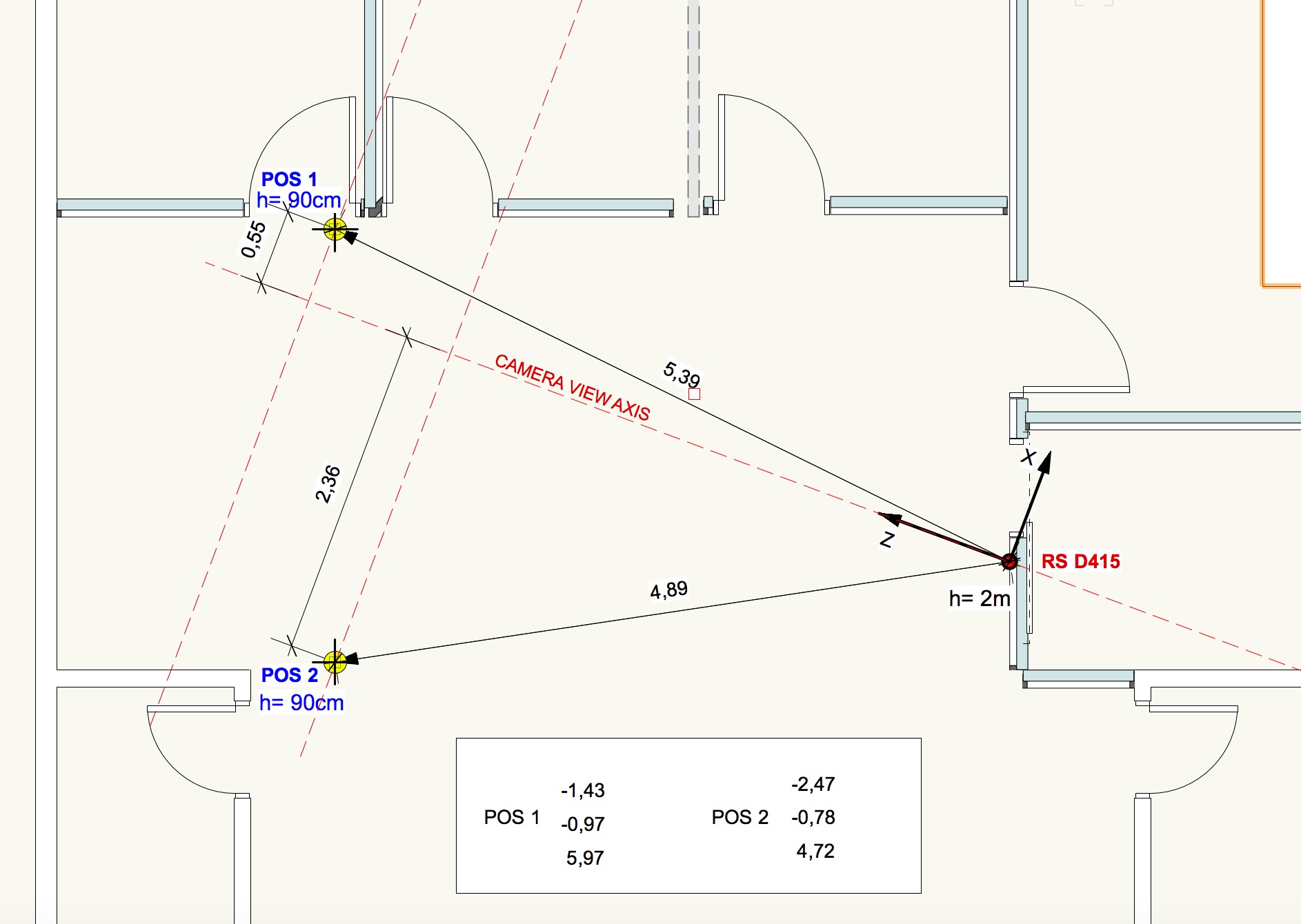
In the plan drawing (below) you can see the values got from deproject_pixel _to_point() … referenced as POS 1 and POS 2, which are positions registered from the tracked people in 2 arbitrary locations.
My questions:
- I assume that rs2_deproject_pixel_to_point() returns the X,Y,Z coordinates in relation to the Camera Coordinates system. Is that assumption correct ?
- Does depth_frame.get_distance(xC,yC) ... returns the Euclidean distance from one point in the image and the center of depth sensor ?
- Considering the values returned as Camera Coord. System, i made some projections perpendicular do the camera axis, and some of the values returned by deproject does not make much sense. Mainly X of Position 1.
Once i could understand well those camera coordinates, getting world coordinates is an easy step (only requires to know the camera translation, rotation of the camera in relation to the origin of the axis in actual camera. And applying those extrinsics to the coordinate results captured by the camera.
-
The Python case linked to below that describes how to deproject a color pixel with rs2_deproject_pixel_to_point may be helpful to you.
https://github.com/IntelRealSense/librealsense/issues/2458
In regard to your questions:
1. The camera coordinate system's world origin (0,0,0) is the center of the left infrared imager. More information about the coordinate system can be found in this link:
https://github.com/IntelRealSense/librealsense/issues/7279#issuecomment-689031488
Within that discussion, a RealSense team member provides further detailed explanation of the coordinate system:
https://github.com/IntelRealSense/librealsense/issues/7279#issuecomment-690188950
2. The documentation for depth_frame.get_distance states that it returns "the depth in meters at the given pixel".
Please sign in to leave a comment.
Comments
3 comments