SDK 2 | Depth frame | Point cloud distortion
-
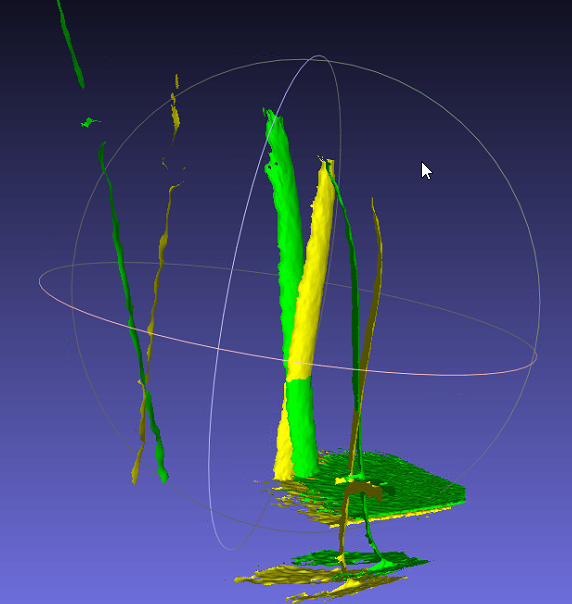
Hi Veronica Bianchi R4p Multiple SR300 / SR305 cameras can interfere with each other, unlike the RealSense 400 Series cameras that do not interfere with each other. As a starting point in investigating your case, may I first ask whether you are deactivating a camera that has just taken a point cloud capture before activating the next camera in the four-camera set so that only one camera is active at a time, please?
-
Hi MartyG, we aware of the risk of interference and therefore yes, we do deactivate a camera after taking the pointcloud and before activating the following camera.
Anyway, we are doing a very simple test: we connect only one cam and we acquire from this single camera. What we do not understand by now is why the same camera generates 2 poitnclouds that are so different one from the other by using the 2 examples I mentioned. Is it possible we are not configuring the camera at its best? Do you know if there are compulsory options to set (because maybe we are just not setting the camera in the correct way)?
-
Sorry, you are totally right, we did few modifications to the examples of the SDK and renamed them.
Here below you can see the code of what we called SavePointCloudMC . That was obtained applying few modifications to the example: rs-multicam.cpp
int main(int argc, char * argv[]) try
{
	int choice = 0;    // VAriable to select 1 of 4 sensors

	// Capture serial numbers before opening streaming
	std::vector<std::string> serials;
	rs2::context ctx;        // Create librealsense context for managing devices

	for (auto&& dev : ctx.query_devices())
		serials.push_back(dev.get_info(RS2_CAMERA_INFO_SERIAL_NUMBER));

	std::cout << "Select Device for point cloud acquisition: " << std::endl;
	for (int i = 0; i < serials.size(); i++)
		std::cout << i << " - " << serials[i]<<std::endl;

	if (serials.size() > 0)
	{
		std::cin >> choice;
		if (choice > serials.size())
			std::cout << "Out of range." << std::endl;

		// Declare pointcloud object, for calculating pointclouds and texture mappings
		rs2::pointcloud pc;
		// We want the points object to be persistent so we can display the last cloud when a frame drops
		rs2::points points;

		if (choice < serials.size())  // singolo device scelto
		{
			// Declare RealSense pipeline, encapsulating the actual device and sensors
			rs2::pipeline pipe(ctx);
			rs2::config cfg;
			cfg.enable_device(serials[choice]);
			pipe.start(cfg);

			// Wait for the next set of frames from the camera
			auto frames = pipe.wait_for_frames();

			auto color = frames.get_color_frame();

			// For cameras that don't have RGB sensor, we'll map the pointcloud to infrared instead of color
			if (!color)
				color = frames.get_infrared_frame();

			// Tell pointcloud object to map to this color frame
			pc.map_to(color);

			auto depth = frames.get_depth_frame();
			points = pc.calculate(depth);	// Generate the pointcloud and texture mappings

			std::string filename = "sensor_" + serials[choice] + ".ply";
			points.export_to_ply(filename, color);
		}
	}
	else
		std::cout << "No sensor connected." << std::endl;
    return EXIT_SUCCESS;
}
Here below you can see the code of what we called PointCloudMC . That was obtained applying few modifications to the example: rs-pointcloud.cpp
int main(int argc, char * argv[]) try
{
    // Declare pointcloud object, for calculating pointclouds and texture mappings
    rs2::pointcloud pc;
    // We want the points object to be persistent so we can display the last cloud when a frame drops
    rs2::points points;

    // Declare RealSense pipeline, encapsulating the actual device and sensors
    rs2::pipeline pipe;
    // Start streaming with default recommended configuration
    pipe.start();

	int counter = 0;
	std::string plyName ="testPointCloud.ply";

    while (app) // Application still alive?
    {
		counter++;
        auto frames = pipe.wait_for_frames();				// Wait for the next set of frames from the camera

        auto color = frames.get_color_frame();

        // For cameras that don't have RGB sensor, we'll map the pointcloud to infrared instead of color
        if (!color)
            color = frames.get_infrared_frame();

        // Tell pointcloud object to map to this color frame
        pc.map_to(color);

        auto depth = frames.get_depth_frame();

        // Generate the pointcloud and texture mappings
        points = pc.calculate(depth);

		// I take the 20th frame after initialization
		if (counter == 20)
		{
			points.export_to_ply(plyName, color);
		}
   }
    return EXIT_SUCCESS;
}
Thank you very much for your support, I really hope that we can solve it together!
-
I recalled a recent case in which somebody was doing almost the same as you - using four SR305 and trying to create an application to capture separate ply files by having one camera at a time active (due to the interference issue of havig several SR305 active simultaneously). They too had been using rs-multicam as the basis of the tests for their project.
I pointed them to a multicam script where a RealSense user had succeeded in being able to select specific cameras by their serial number (400 Series cameras in their particular case) instead of having all of them enabled and posted their script. The script, like yours, generates a point cloud and exports it to ply.
https://github.com/IntelRealSense/librealsense/issues/2219#issuecomment-412041802
In that discussion, they developed the project further and posted a script at the end of the discussion for the completed project that could access al cameras simultaneously. In your SR305-based project though, the link above may be sufficient for your needs.
-
Thank you very much for sharing the link, I will for sure take a look at this code.
However, my question was actually more focused on understanding why I obtain 2 different point clouds by executing the 2 examples above even if I am testing a single sensor in the same exact environment conditions.
Is there any possibility that by using rs2::context and rs2::config to initialize and start the pipeline is implicitly setting some parameters/options I am not aware of? Because to me that is the main difference between the 2 codes. -
If you are using multicam code then it is recommended to use poll_for_frames() like the rs_multicam example does instead of wait_for_frames(), even if you currently have only one camera attached during your test of that code. The difference between these instructions is explained in the link below.
https://github.com/IntelRealSense/librealsense/issues/2422#issuecomment-423254709
-
I suggested poll_for_frames() just because it is general recommended practice for multicam applications, though some RealSense users do choose to use wait_for_frames() and find that it does not negatively affect their particular application.
During research of your question about this though, I did locate a case where a RealSense user was using poll_for_frames() with a multicam point cloud application based on rs-multicam and experiencing distorted point clouds. There was not a clear solution achieved in that particular case.
https://github.com/IntelRealSense/librealsense/issues/6560
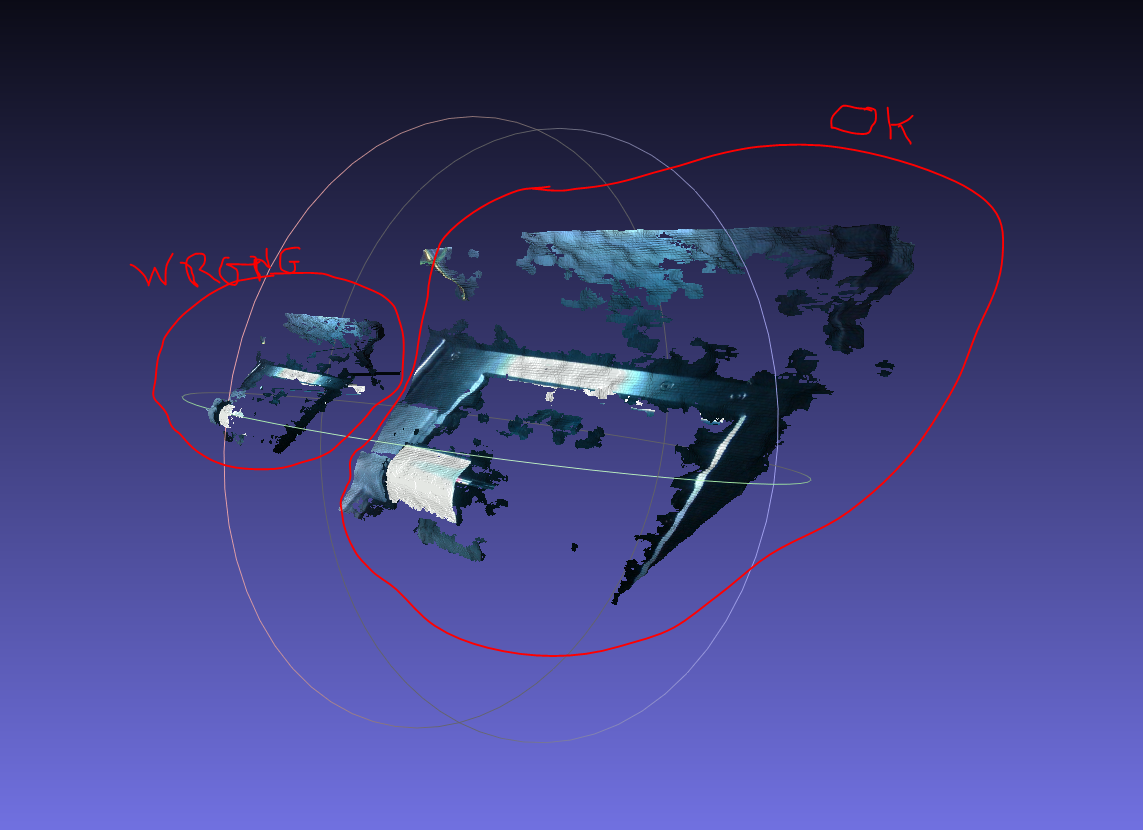
Sometimes distortion of ply data may occur if the ply is being loaded into a viewing program that is set to use a different depth scale than the scale that the RealSense SDK was using when the ply was created. If your ply that was exported from the script based on rs-pointcloud displays correctly though then that may eliminate that possibility, as that ply should be using the same SDK depth scale as the rs-multicam based code.
-
Well, in my case it is an actual distortion and not just a re-scaling issue, so I'm not 100% sure the depth scale of the viewing program can be causing it. Anyway I will implement the poll_for_frames() and let you know.
I also read in https://github.com/IntelRealSense/librealsense/issues/6560 it is better to avoid sequences of start-stop-start-stop. How do you suggest to manage multiple streams from multiple devices then? Because, as you wrote me yesterday if the sensors are active simultaneously they will interfere with each other.
-
Ok, got it. We are not stressing the system with a high rate of start-stop sequences so I guess this will not be a problem.
We implemented and tested the poll_for_frames() and unfortunately the pointcloud is still distorted.
What we actually have in common with the post you linked me yesterday is the initialization and the start of the pipe by using the context and config declaration. Do you think this can affect the quallity of the cloud in some way?
-
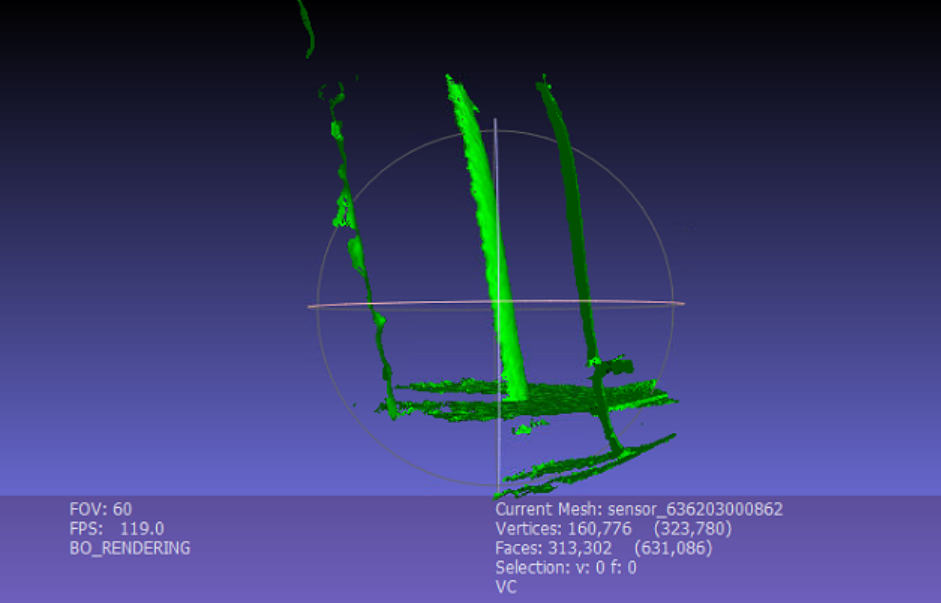
Would it be possible to post further point cloud images, as I am not sure from the one at the top of the discussion about which part of the cloud is from which script.
Having said that, I considered a different approach to the problem. If you ideally want all four SR305 active at the same time but cannot because of IR projection interference, then you may be able to solve the problem by setting the laser power of three of the cameras to zero and set the laser power of the fourth camera to maximum. I researched the idea and found that another RealSense user had already done this with four SR305 and posted their scripting.
-
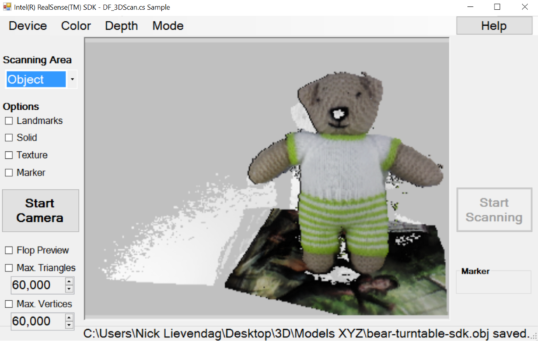
May I ask please what the purpose of the point cloud scan is please? If it is to create a 3D representation of an object then you may get better results with SR300 technology from a solid 3D model scan (an .obj format file), like the ones below that were made with a single SR300 with objects rotating on a turntable as they are scanned.

-
Yes, the SR305 has the SR300 camera module inside it and acted as an entry-level model in the RealSense product family with a new casing that was easier to mount. The SR300 technology dates back to the start of 2016 and so has more limited capabilities compared to more modern RealSense cameras such as the 400 Series.
I note that on the point cloud image that you are dissatisifed with, it is reporting an FPS of 119.0. How is that FPS value generated in your program, please? I would expect the maximum supported depth FPS on SR305 to be 60 FPS, as stated in the camera's technical data sheet document.

-
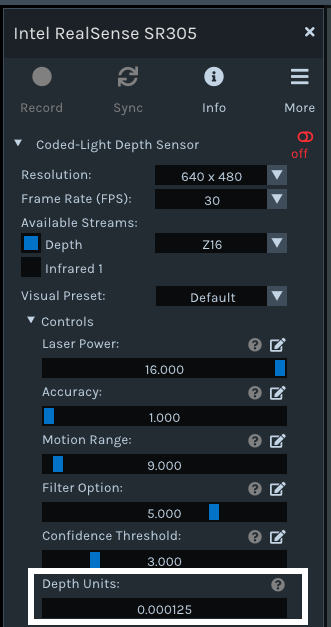
I remember that the SR300 has a different depth scale to the 400 Series cameras. The default depth scale on the 400 Series cameras is 1mm ('0.001' meters). On the SR300 though it is 1/32 mm, which is shown as a default scale of 0.000125 in the RealSense Viewer. So that could have a distortive impact if the program that is viewing the exported ply file is also not using the 0.000125 scale.
-
Hi MartyG, we are using the same viewer to visualize the outputs of both examples and only in 1 case it is distorted.
In addition, yesterday mi colleagues carried out several tests with the same setup (testing also different pc and both sdk 2.22 and 2.41) and apparently using the example without context and config is always working fine while instead running the acquisition by initializing and starting the pipeline with rs2::context and rs2::config (code above) not. Therefore now we are sure that this is is the cause of the distortion.
-
I have been through all the multicam code again from the beginning. A point that keeps coming to my notice is that your conversion does not make use of an emplace instruction as part of the code for creating a separate pipeline for each camera, whilst multicam-enabled code does use emplace.
****************
// Start a streaming pipe per each connected device
for (auto&& dev : ctx.query_devices())
{
rs2::pipeline pipe(ctx);
rs2::config cfg;
cfg.enable_device(dev.get_info(RS2_CAMERA_INFO_SERIAL_NUMBER));
pipe.start(cfg);
pipelines.emplace_back(pipe);
}'pipelines' is defined by inserting the line below directly beneath rs2::context ctx
std::vector<rs2::pipeline> pipelines;
https://github.com/IntelRealSense/librealsense/blob/master/examples/multicam/rs-multicam.cpp#L19
-
If auto-exposure is being used then there is the possibility of bad frames at pipeline start because the auto-exposure is still settling down for the first several frames (this problem does not occur when using manual exposure values). So it is a good practice to skip the first several frames at pipeline start. Maybe you are experiencing something similar if you have auto-exposure enabled.
-
At the start of this case you mentioned that you were using SDK 2.22. Did you mean 2.42? As version 2.22 dates back to May 2019 and so is very out of date.
If you are using 2.22: if this issue is one that is specific to multicam code, since you do not experience it in the code based on pointcloud.cpp, there were improvements to multicam handling introduced in version 2.35.2 that improved problems that may have been related to rs2::pipeline.
Please sign in to leave a comment.
Comments
25 comments